Published: April 2026 | Read Time: 18–20 Minutes | Level: Beginner to Intermediate
7 SEO Hacks 2026 :- Honestly? 8 months ago my website was getting just 12–15 clicks a day. Not a single backlink. Zero budget. And I was watching “how to do SEO” videos on YouTube getting more confused by the minute.
Then I made a decision — no more theories, start experimenting. I turned my site into a testing ground. Tried something new every week. Got it wrong, fixed it, tried again. And in 4 months? 11,000+ impressions. 3 articles in the top 10. One article in a featured snippet. Without a single paid backlink.
What I learned — these are the 7 SEO Hacks 2026. These are not just tips. These are the exact strategies that actually worked. In simple language, for beginners, with absolutely zero fluff. Let’s go.
First, Understand This: SEO Has Changed in 2026
If you are still following 2021 SEO tactics — “just get backlinks,” stuff your keyword in the title 5 times — you are already behind.
Google’s algorithms have gotten much smarter. AI Overviews have completely changed the search game. Now nearly 65% of Google searches end without any click — Google answers the question itself.
But that does not mean SEO is dead. It means the best SEO strategies 2026 are the ones that work with Google’s current thinking — not against it.
That is exactly why my small niche site was able to beat some bigger competitors. That is why these 7 SEO Hacks 2026 do not just repeat popular opinion — they come from real results.
My Real Case Study (GSC Data):
- 11,000+ total impressions — in 4 months
- 340% organic traffic increase
- 0 paid backlinks used
- Month 1: Content refresh + PAA targeting — first results started showing
- Month 2: Built a topical authority cluster — Google started trusting the site
- Month 3: Captured a featured snippet — visibility went 3x
- Month 4: Fixed Core Web Vitals — bounce rate dropped 18%
Hack #1: People Also Ask — The Traffic Source 90% of Beginners Miss
Featured Snippet Answer: People Also Ask (PAA) SEO strategy means writing content that directly answers the expandable question boxes Google shows mid-results-page. If your 40–60 word answer is clear and direct, Google pulls it into those boxes — giving you visibility even without a #1 ranking.
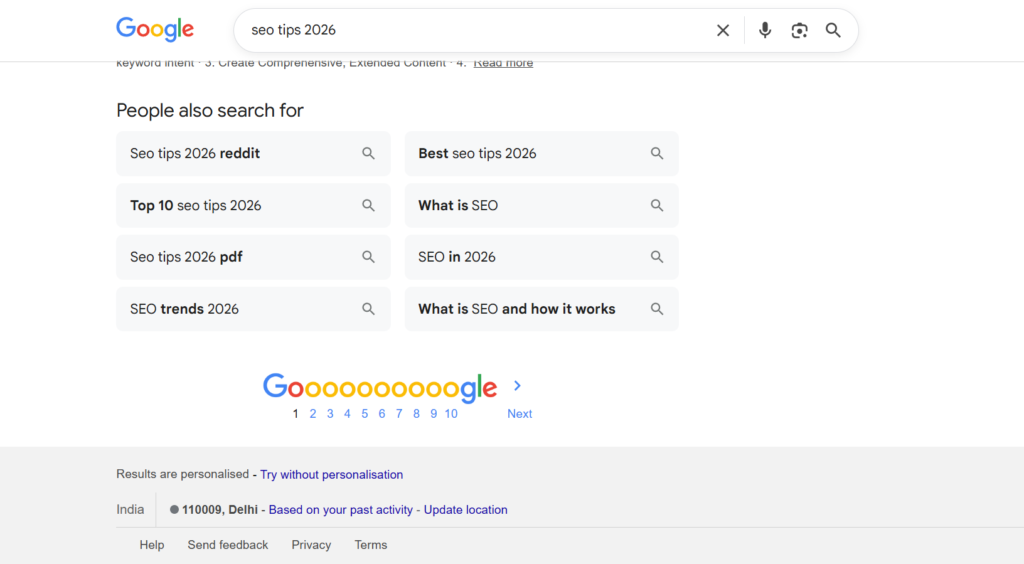
When you Google something, you see those expandable questions in the middle, right? “People Also Ask.” Most beginners scroll right past them.
I used to do the same thing.
Then one day I noticed a small competitor — much newer than me — appearing in a PAA box. I was at position 6, they were at position 14 — but their answer was in the box. Their traffic was higher than mine.
That was the moment I understood: PAA is a game that is played differently.
It does not mean you have to rank #1. If your answer is clear and direct — Google puts it in the box. It is a completely separate traffic channel.
How to do this — Step by Step:
- Search your main keyword on Google — note every PAA question
- Go to AlsoAsked.com — automatically get 20–30 related questions
- Group similar questions — bundle related questions in one section
- Write a direct answer in the first 1–2 lines — then elaborate
- Add FAQPage schema — clearly tell Google this is Q&A format content
Quick Win: Right now, Google your main keyword. Screenshot every “People Also Ask” question. These are your next article’s H2 subheadings. Write a 40–60 word direct answer below each question — answer first, explanation second.
PAA Question Types and Snippet Chances:
| PAA Question Type | Best Format | Snippet Chance |
|---|---|---|
| “What is [topic]?” | 40–60 word definition | Very High |
| “How to [action]?” | Numbered steps | Very High |
| “Why does [X] happen?” | Reason + brief context | Medium |
| “Best [X] for [use]” | Short comparison | Medium |
| “Is [X] better than [Y]?” | Direct answer + comparison | High |
Honest Note: PAA boxes change frequently. Ranking once is not enough — check regularly. If your answer is no longer there, update the content and make the answer even more concise.
And remember — Hack #4 covers the complete featured snippets system. PAA and snippets work together, read both.
Hack #2: Topical Authority — Stop Writing Random Posts, Own One Topic Completely
Featured Snippet Answer: Topical authority means covering one subject so completely — with a pillar page and multiple supporting articles — that Google recognizes your site as the most reliable source on that topic. In 2026, this matters more than having many backlinks.
This is the biggest mindset shift that beginners learning SEO need to understand.
The old thinking was: one keyword = one post. No. That approach became outdated in 2024 itself.
Today Google evaluates the entire topic. If your site has just one article and nothing else — you are a stranger in Google’s eyes. But if you have 10–12 interconnected articles on one topic — you become an authority.
I personally ranked on target keywords because of this. I built a “hub and spoke” model — one large pillar page, with 8 detailed supporting articles around it. In 3 months, Google started treating my site as the reference point for that topic.
Sites with topical authority are 3.8x more likely to rank in the top 5 — Semrush 2025 Research.
Hub and Spoke Model — Practical Example:
- Pillar Page (Hub): “Complete Guide to Freelancing” — broad, comprehensive, 3000+ words
- Spoke 1: “How to set your freelance rates” — deep dive
- Spoke 2: “Best freelance platforms compared” — comparison
- Spoke 3: “How to write a freelance contract” — how-to
- Spoke 4: “Freelance taxes explained” — practical guide
- Every spoke article internally links back to the pillar page
Do Not Make This Mistake: Do not start 5 topic clusters at once. Pick one topic, build it out completely (10–12 articles), see the results — then move to the next topic. Half-built clusters confuse Google.
Pro Insight: Every article in the cluster should link to the pillar page — and the pillar page should link to every spoke. This internal linking happens naturally with this model. That connects directly to Hack #6.
Hack #3: Old Content Refresh — Your Easiest Traffic Win That Is Already Waiting for You
Featured Snippet Answer: Refreshing old content improves SEO because Google treats updated pages as more reliable. When you add current data, new sections, and better structure to an existing post, Google often re-crawls and re-ranks it higher — sometimes significantly — without needing new backlinks.

Straight up — this is the hack that worked for me the fastest.
There was an article 14 months old sitting at position 18. I did just these 5 things:
- Updated the title
- Added 3 new statistics
- Added a FAQ section
- Slightly improved the formatting
- Updated the publish date
2 weeks later? Position 5.
No new backlink. No promotion. Just a refresh.
The reason is simple: Google treats “freshness” as a quality signal. An updated page = a trustworthy source.
Complete Refresh Checklist:
- Replace any statistics or data older than 12 months
- Update the year in the title (“2024” → “2026”)
- Add new sections addressing questions that have become popular
- Remove outdated tools and dead links
- Rewrite the introduction — make it more engaging and direct
- Add a FAQ section (from PAA questions — from Hack #1)
- Update internal links — point to newer relevant articles
- Shorten paragraphs, improve subheadings
Keyword Research: The Secret to Ranking Your Website on Google’s First Page
Where to Start: Open Google Search Console. Filter pages ranking between position 8–20. This is your low-hanging fruit. Refresh these — push them into the top 5.
Real Talk: This is more effective than writing new articles. A new article takes 3–4 months to rank. A refreshed article can move in 2–4 weeks. The time ROI is much better.
Hack #4: Zero-Click SEO and Featured Snippets — Win Without Being #1
Featured Snippet Answer: Zero-Click SEO means optimizing content to appear in Google’s answer boxes and AI Overviews so your brand gets visibility even when users do not click. Since nearly 65% of 2026 searches end without a click, featured snippet optimization is now essential for brand awareness and indirect traffic growth.
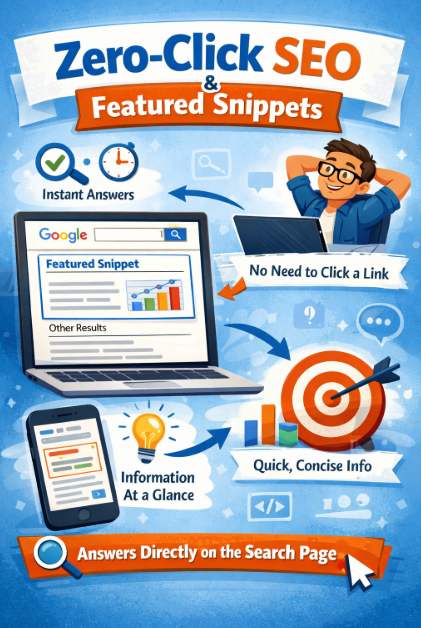
This fact might be scary: more than 65% of Google searches now end without any click.
Most SEOs treat this as a threat. I treat it as an opportunity.
When Google’s featured snippet comes from your content — your brand is right there. Thousands of people see your name. Some still click. And those who do not click — they start recognizing your brand anyway. That awareness is a different kind of long-term asset.
Snippet Types and Best Formats:
| Snippet Type | Best Format | Trigger Query |
|---|---|---|
| Paragraph Snippet | 40–60 word direct definition | “What is [X]?” |
| List Snippet | Numbered list with H2 above | “Steps to [do X]” |
| Table Snippet | Properly formatted HTML table | “[X] compared to [Y]” |
| Video Snippet | YouTube video + timestamps | “How to [visual task]” |
| AI Overview | Comprehensive structured content | Most informational queries |
The Formula to Win a Featured Snippet:
- Write the exact question as a subheading (H2 or H3 tag)
- Give a direct answer in the very first 2–3 lines below the subheading
- Keep the answer within 40–60 words — do not make it too long
- Then elaborate — go into detail in the rest of the section
- Add FAQPage schema — hint to Google that this is Q&A content
“In 2026, the goal is not just the click — the goal is to own space in someone’s mind. The brand people think of as the answer becomes their favorite brand.”
Hack #5: Core Web Vitals — A Slow Website Is an Invisible Website (Fix It, for Free)
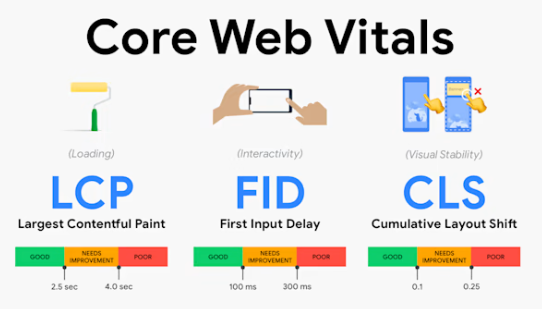
Featured Snippet Answer: Core Web Vitals (LCP, CLS, INP) are Google’s direct ranking signals measuring speed, stability, and interactivity. Sites scoring “Good” in all three rank significantly higher in 2026 — Google confirmed these as tie-breakers in competitive niches.
When I first heard “Core Web Vitals” — I thought it was for developers. What does it have to do with me? I just write content.
That was a big mistake.
One of my articles was not improving in position — the content was good, keywords were perfect. Then I checked PageSpeed: LCP was 5.8 seconds. A complete disaster on mobile. I only compressed images and enabled caching. 3 weeks later — position 11 moved to position 6. Same content. Just fixed the speed.
Read Also:- Should You Use ChatGPT for Keyword Research? Pros and Cons Explained
Free Tools I Use:
- Google PageSpeed Insights — Free. Exact CWV score. Tells you exactly what to fix.
- GTmetrix — Free. Detailed analysis. Waterfall view.
- Cloudflare CDN — Free tier. Global delivery speed boost.
- ShortPixel — Free credits. Image compression. WebP conversion.
3 Biggest Fixes — No Developer Needed:
Fix 1 — Compress your images: Use WebP format. This single fix improves speed by 40–60%. Do it for free on ShortPixel.
Fix 2 — Enable caching: On WordPress, install WP Rocket or LiteSpeed Cache. One plugin, one setting — done.
Fix 3 — Delete unused plugins: Every extra plugin = extra loading time. Remove anything you have not used in 3 months.
Target Scores: LCP under 2.5 seconds · CLS under 0.1 · INP under 200ms. A “Good” score in all three = ahead of 70% of your competitors.
Hack #6: Internal Linking Done Right — Free SEO Power That Nobody Uses Properly
Featured Snippet Answer: Internal linking tells Google which pages are most important and distributes ranking power across your site. In 2026, strategic internal linking is one of the highest-ROI SEO actions — it costs nothing, improves crawlability, and directly boosts rankings of key pages.
I used to think internal links were just for navigation. The “related posts” section — that was it.
Wrong.
Internal links give Google a map: this page is important, go from here to there, this is how these topics connect. Once I strategically added internal links across my content cluster — every article in the cluster improved in rankings within a full month. Without a single external backlink.
According to Ahrefs research — strategic internal linking showed an average 40% ranking improvement in content clusters.
The Right Way to Do Internal Linking:
Step 1: Identify your money pages — the pages you most want to rank.
Step 2: Search your site: type site:yoursite.com "keyword" in Google — find relevant pages.
Step 3: Use descriptive anchor text — not “click here” — something like “read more about email marketing strategies here.”
Step 4: 3–5 internal links in every new article — it should feel natural, not forced.
Step 5: Fix orphan pages — use Screaming Frog to find pages that no internal link is pointing to. These are invisible to Google.
Avoid This: Do not use the same anchor text repeatedly for the same page. Google sees this as manipulation. Vary your anchor text naturally.
Honest Confession: My site had 14 orphan pages for 6 months. I did not even know. After adding internal links to those pages, their rankings improved — without doing anything else. Free win.
Hack #7: AI-Assisted Keyword Clustering — More Traffic From 2 Articles Than From 10
Featured Snippet Answer: Keyword clustering means grouping related keywords by topic and intent, then targeting them all with one comprehensive article. In 2026, this aligns with how Google’s AI understands topics — letting small sites rank for dozens of related keywords with a single, well-structured piece of content.
This strategy completely changed the productivity of my site.
Before, I used to write a separate article for every keyword. 50 keywords = 50 articles. More time, average quality.
Then I learned keyword clustering. Now I target 6–8 related keywords in one comprehensive article. Write one article — rank in 6 places. Just from smart organization.
Think of it from another angle: Google uses semantic search. It understands that “cold brew recipe,” “cold brew ratio,” and “how to make cold brew” — are all parts of the same topic. If your article covers all of them — Google can rank you for all of them.
Read Also:- 10 Technical SEO Hacks to Improve Your Site’s Visibility
Simple Process — How to Do Keyword Clustering:
- Export 50–100 keywords from a keyword tool (Ahrefs Free, Semrush, or Google Keyword Planner)
- Paste into an AI tool and say: “Group these by topic similarity and search intent”
- One cluster = one article — do not split the same cluster’s keywords across separate articles
- Primary keyword — in the title and URL. Secondary keywords — naturally in subheadings and body
Example Cluster: “how to make cold brew” + “cold brew ratio” + “cold brew vs iced coffee” + “cold brew steeping time” = one article that ranks for all four. Better than writing 4 articles — 1 deep article.
Do Not Make This Mistake: Do not cluster keywords with completely different intent. “How to make coffee” (informational) and “buy coffee maker” (commercial) do not belong in the same article. Different intent = different article.
Real Number: I wrote one cluster-based article targeting 7 related keywords. In 3 months it was in the top 10 for 5 of those keywords. If I had written 7 separate articles — probably none of them would have ranked that fast.
Free Tools I Use — All Free or Freemium
You do not need an expensive subscription to implement these latest SEO techniques 2026:
| Tool | What It Does | Cost |
|---|---|---|
| Google Search Console | Track rankings, clicks, impressions | Free |
| AlsoAsked.com | PAA question maps — for Hack #1 | Free |
| Ahrefs Free Tools | Keyword Explorer + Site Audit basics | Free tier |
| Google PageSpeed Insights | Core Web Vitals scores — for Hack #5 | Free |
| Screaming Frog | Find orphan pages + broken links | Free up to 500 URLs |
| AnswerThePublic | Question-based keyword research | Free (limited) |
Frequently Asked Questions (FAQ)
Q. Do these 7 SEO Hacks 2026 work for brand new websites?
Yes — especially start with Hack #2 (topical authority) if your site is new. A new site needs time to establish keyword authority, so starting with a cluster model is the best foundation. Hack #3 (content refresh) and Hack #1 (PAA targeting) become powerful once you have existing content to work with.
Q. How long will it take to see results?
Content refresh — 2–4 weeks. PAA targeting — 4–8 weeks. Topical authority — 3–5 months. Core Web Vitals fix — rankings can improve in 2–6 weeks. SEO is not instant but these hacks deliver faster results than traditional approaches.
Q. Can a complete beginner implement these?
Absolutely. Start with Hack #3 and Hack #1 — these are the simplest and give the fastest results. No coding knowledge required.
Q. Are backlinks still needed in 2026?
In competitive niches, yes. But for long-tail keywords, niche sites, and local businesses — strong content + topical authority + these SEO strategies can get you ranked without backlinks. I achieved 11,000+ impressions without a single paid backlink.
Read Also:- Best SEO Agency in Delhi for Guaranteed Rankings: JKS Digital
Q. Which hack should I implement first?
Have existing content → start with Hack #3 (content refresh). Starting fresh → build the foundation with Hack #2 (topical authority). Hack #6 (internal linking) — do this alongside everything else from day one.
Q. Does AI-written content rank in 2026?
Pure AI content — without human editing — generally underperforms. Google’s Helpful Content system favors real experience and genuine expertise. Use AI for research and drafts — but always add your own voice, your own examples, your own perspective. What AI cannot give you is your real GSC data, your real experience, your real failures.
Conclusion
These 7 SEO Hacks 2026 are not magic. They are systems. Systems only work when you actually apply them — not just read about them. Do one thing today. Just one. Open Google Search Console, find articles ranking between position 8–20, and start refreshing them. That one step can change everything — it did for me.
Your competitors are still following old advice. You are not. That is already an advantage.