15 SEO Mistakes in 2026:- Let’s be honest — SEO in 2026 is not what it used to be. Google has become smarter, users have become more demanding, and the competition online is fiercer than ever. Yet, every single day, thousands of website owners unknowingly make the same mistakes that quietly destroy their rankings and drain their traffic. If your website is not showing up on Google’s first page, chances are high that one (or more) of these mistakes is responsible.
In this article, we are going to walk through the 15 SEO mistakes in 2026 that are actually holding real businesses back — not some theoretical list, but mistakes we see every day when auditing websites. More importantly, we will show you exactly how to fix each one, so you can start climbing the rankings and driving consistent organic traffic.
Whether you are a complete beginner or someone who has been doing SEO for a year or two, this guide is written in plain English. No unnecessary jargon. No fluff. Just real problems and practical solutions.
Mistake #1: Ignoring Search Intent (The #1 Beginner Mistake)
The Problem: Creating content without understanding WHY someone is searching for a keyword.
Search intent is the ‘why’ behind every Google search. When someone types ‘best running shoes,’ they are not looking for a history of running shoes — they want to buy or compare options. When someone types ‘how to tie shoelaces,’ they want a step-by-step tutorial. Google has become incredibly good at detecting what type of content a user wants, and if your page does not match that intent, it will not rank — no matter how well-written or keyword-optimised it is.
- Informational intent: User wants to learn something (e.g., ‘what is SEO’)
- Navigational intent: User wants to find a specific site (e.g., ‘Facebook login’)
- Commercial intent: User is comparing options (e.g., ‘best CRM tools 2026’)
- Transactional intent: User wants to buy (e.g., ‘buy Nike Air Max online’)
How to Fix It: Before writing any piece of content, Google your target keyword. Look at the top 5 results. Are they blog posts? Product pages? Videos? That is your signal. Match the format, depth, and angle of what Google is already showing for that search.
Pro Tip: Use tools like Ahrefs or Semrush to see the ‘SERP features’ for your keyword. If featured snippets dominate, structure your content with clear definitions and short answers.
Mistake #2: Targeting Keywords That Are Too Competitive
The Problem: New websites trying to rank for broad, high-competition keywords like ‘digital marketing’ or ‘SEO tips.’
This is the mistake that kills motivation. You spend weeks writing the perfect article, publish it, and… nothing. Not even a page 5 ranking. The reason is simple — you are competing against websites with thousands of backlinks, years of domain authority, and entire content teams. For a new or small website, targeting highly competitive keywords is like entering a Formula 1 race with a bicycle.
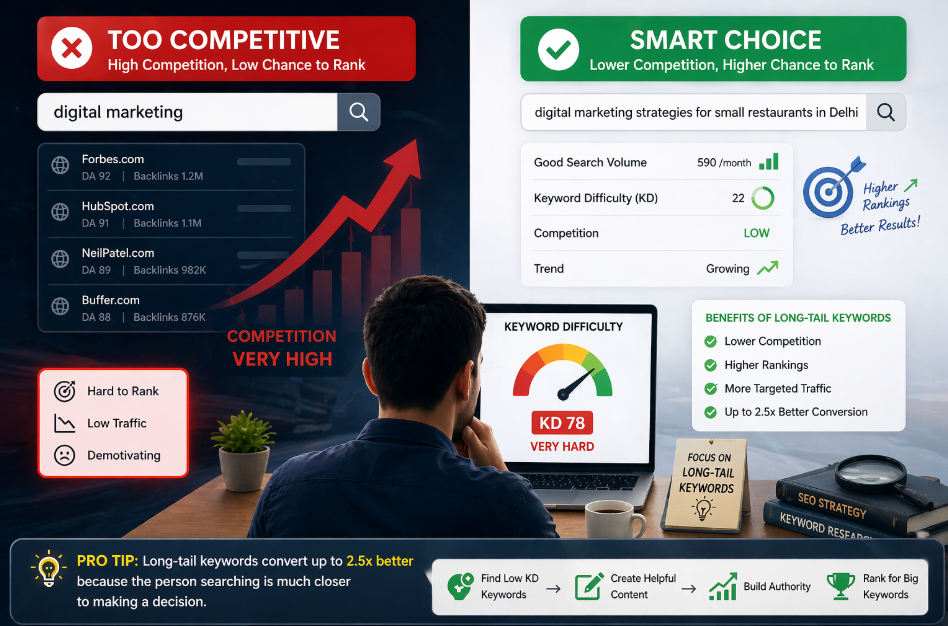
- Instead of ‘digital marketing,’ target ‘digital marketing strategies for small restaurants in Delhi’
- Instead of ‘SEO tips,’ target ‘SEO tips for e-commerce stores under 6 months old’
- Use long-tail keywords (4+ words) — they have lower competition and higher conversion rates
How to Fix It: Use Google’s free Keyword Planner or a tool like Ubersuggest to find keywords with low difficulty (KD below 30 for beginners) and decent monthly searches (100–1,000 per month is a great starting range). Build your authority first, then target bigger keywords over time.
Pro Tip: Long-tail keywords convert up to 2.5x better than broad keywords because the person searching is much closer to making a decision.
Mistake #3: Writing Thin, Low-Value Content
The Problem: Publishing 300–500 word articles thinking that is enough to rank on Google.
In 2026, Google’s algorithm is heavily focused on content quality and depth. A 400-word blog post on ‘how to start a business’ is not going to outrank a comprehensive 3,000-word guide that covers every single aspect a reader needs to know. Thin content is content that does not fully satisfy the user’s query. It might have the right keywords, but it leaves the reader with more questions than answers. Google tracks user behaviour — if people click your article and immediately hit ‘back’ (called a ‘pogo stick effect’), Google takes that as a strong signal that your content is not helpful.
- Aim for at least 1,500–2,500 words for competitive topics
- Cover the topic completely — answer every question a beginner might have
- Include examples, case studies, screenshots, and step-by-step breakdowns
- Use H2 and H3 headings so readers can navigate easily
How to Fix It: Before writing, type your keyword into Google and look at the ‘People Also Ask’ section. Those are the sub-questions your article must answer. Also check the ‘Related Searches’ at the bottom of the page — add those topics to your article naturally.
Pro Tip: Longer does not always mean better. A 2,000-word article that is well-structured and fully covers a topic will always beat a 5,000-word article that rambles. Quality + depth = rankings.
Mistake #4: Neglecting Title Tags and Meta Descriptions
The Problem: Leaving title tags vague, too long, or missing meta descriptions entirely.
Your title tag is the first thing both Google and users see in search results. It is your headline, your first impression, and one of the most important on-page SEO factors. Yet so many websites either leave the default CMS-generated title (which often looks like ‘Home | WordPress Site’) or write something so generic it tells nobody anything. A weak title tag means lower click-through rates. Lower click-through rates mean less traffic. Less traffic means worse rankings — it is a downward spiral. Similarly, the meta description (the 2-line summary under your title in search results) does not directly affect rankings but massively affects whether someone clicks your link.
Read Also:- 7 SEO Hacks 2026 That Actually Work (Tested with Real Results)
- Keep title tags between 50–60 characters (Google cuts off longer titles)
- Include your primary keyword naturally near the beginning
- Add a power word or emotional trigger: ‘Complete,’ ‘Proven,’ ‘Free,’ ‘Ultimate’
- Write meta descriptions of 150–160 characters that clearly state the benefit of clicking
How to Fix It: Treat your title tag like an ad headline. Ask yourself: ‘Would I click this if I saw it on Google?’ If the answer is no, rewrite it. Use the Yoast SEO plugin (WordPress) or Rank Math to preview exactly how your title and description will appear in search results.
Pro Tip: Include the current year in your title (e.g., ‘Best SEO Tools 2026’) — it signals freshness and significantly increases CTR for informational searches.
Mistake #5: Slow Website Speed (Especially on Mobile)
The Problem: Having a website that takes more than 3 seconds to load.
Page speed is no longer just a ‘nice to have’ — it is a confirmed Google ranking factor. In 2026, with Core Web Vitals being a key part of Google’s ranking algorithm, a slow website is actively penalised. But beyond rankings, consider the user experience: 53% of mobile users abandon a page that takes longer than 3 seconds to load. If your website is slow, you are losing rankings AND you are losing visitors who do arrive. The most common causes of a slow website include uncompressed images, too many plugins, cheap hosting, no caching, and bloated theme code.
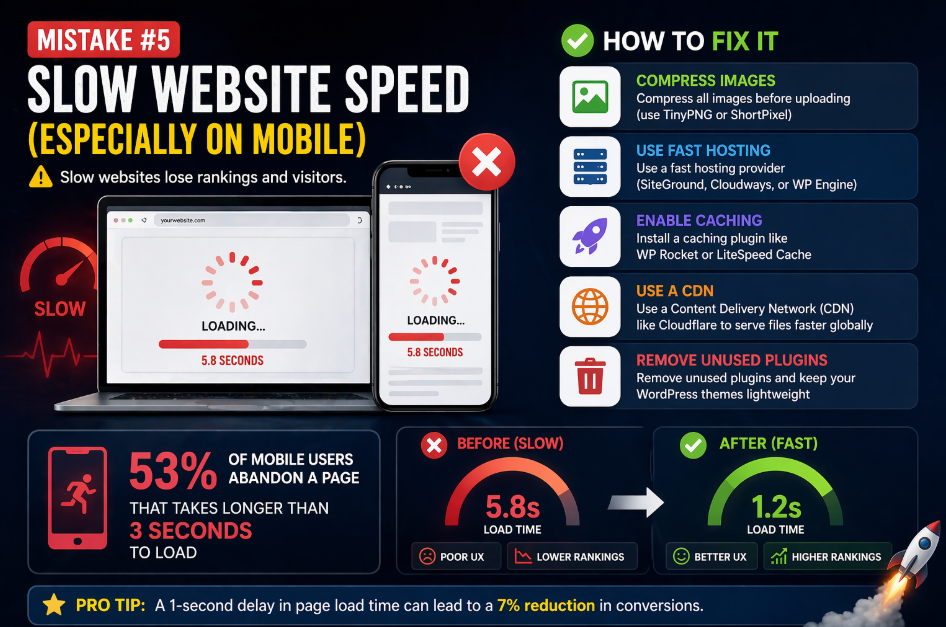
- Compress all images before uploading (use TinyPNG or ShortPixel)
- Use a fast hosting provider (SiteGround, Cloudways, or WP Engine for WordPress)
- Install a caching plugin like WP Rocket or LiteSpeed Cache
- Use a Content Delivery Network (CDN) like Cloudflare to serve files faster globally
- Remove unused plugins and keep your WordPress themes lightweight
How to Fix It: Run your website through Google PageSpeed Insights (free) and Google Search Console’s Core Web Vitals report. Focus first on fixing your LCP (Largest Contentful Paint) — it should be under 2.5 seconds. That single metric has the biggest impact on both user experience and rankings.
Pro Tip: Images account for over 60% of a webpage’s weight on average. Simply compressing your images can cut your page load time in half.
Mistake #6: Not Building Any Backlinks
The Problem: Creating great content but expecting Google to rank it without any external links pointing to it.
Backlinks — links from other websites pointing to yours — are still one of Google’s top 3 ranking factors in 2026. Think of each backlink as a vote of confidence from another website. When a reputable website links to your article, it is essentially saying, ‘This content is trustworthy and valuable.’ Without backlinks, even the best-written article will struggle to rank, especially in competitive niches. Many beginners focus 100% on content and completely ignore link building. That is a mistake. You need both — good content to earn links and an active strategy to build them.
- Guest posting: Write articles for other websites in your niche in exchange for a backlink
- Broken link building: Find broken links on other sites and offer your content as a replacement
- Create shareable assets: Original research, infographics, free tools, and definitive guides naturally attract links
- HARO (Help a Reporter Out): Answer journalist queries and get mentioned (and linked) in major publications
- Local citations: For local businesses, get listed on Google Business Profile, Justdial, IndiaMART, etc.
How to Fix It: Start with guest posting on niche-relevant blogs. Even 5–10 high-quality backlinks from relevant websites can make a significant difference for a new site. Focus on quality over quantity — one link from a domain with high authority beats 50 links from spammy directories.
Pro Tip: Never buy cheap backlinks from Fiverr or random link farms. Google’s spam algorithms detect these patterns and can manually penalise your website, removing it from search results entirely.
Mistake #7: Poor Internal Linking Structure
The Problem: Having blog posts and pages that exist as isolated islands with no links connecting them.
Internal links are the hyperlinks that connect one page on your website to another page on the same website. They serve two critical purposes: first, they help Google’s crawlers discover and index all your pages; second, they pass ‘link equity’ (ranking power) from your stronger pages to your weaker ones. A website with no internal links is like a city with no roads — Google cannot navigate it properly, and users cannot discover your other content. This means your older, stronger articles are not helping your newer ones, and some pages might not even get indexed by Google.
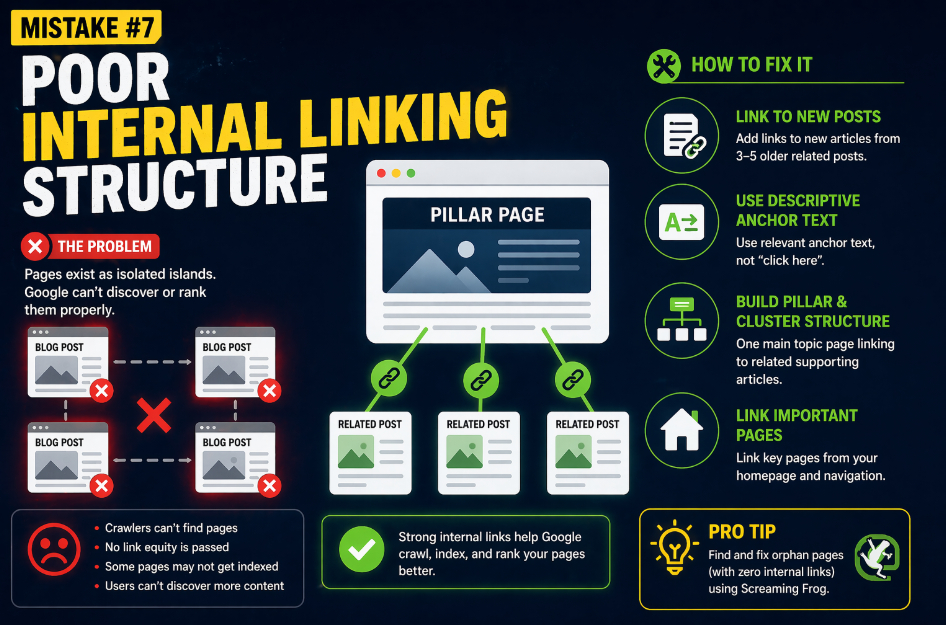
- Whenever you publish a new article, go back to 3–5 older related articles and add a link to the new one
- Use descriptive anchor text (the clickable words) — instead of ‘click here,’ say ‘learn more about on-page SEO techniques’
- Create a ‘pillar and cluster’ structure: one main topic page linking to multiple supporting articles
- Link your most important pages from your homepage and main navigation
Read Also:- Surfer SEO vs Semrush 2026: Which Tool Actually Gets You Ranked? (An Honest, Hands-On Comparison)
How to Fix It: Do an internal link audit using a free tool like Screaming Frog (free up to 500 pages). Look for any pages with zero internal links pointing to them — these are called ‘orphan pages’ and Google often ignores them. Connect them to your site’s main content hub.
Pro Tip: Your homepage typically has the most authority on your website. Make sure it links directly to your most important service pages and key blog posts.
Mistake #8: Ignoring Mobile Optimisation
The Problem: Building a website that looks and works great on desktop but is broken or clunky on smartphones.
In 2026, over 65% of all Google searches happen on mobile devices. More importantly, Google uses mobile-first indexing, meaning it crawls and ranks the mobile version of your website — not the desktop version. If your mobile site has missing content, tiny text, buttons too close together, or images that don’t load properly, Google will penalise your rankings across all devices. Yet many businesses, particularly smaller ones, still treat mobile design as an afterthought. This is one of the most common and costly 15 SEO mistakes in 2026.
- Use a responsive WordPress theme (Astra, GeneratePress) that automatically adapts to screen size
- Make buttons and links large enough to tap with a finger (minimum 48×48 pixels)
- Ensure text is readable without zooming (minimum 16px font size)
- Avoid pop-ups that cover the full screen on mobile — Google penalises these
- Test your site on multiple real devices, not just browser emulators
How to Fix It: Open Google Search Console and check the ‘Mobile Usability’ report. It will show you a specific list of mobile issues affecting your site right now. Fix those issues one by one, starting with the ones affecting the most pages.
Pro Tip: Use Google’s free Mobile-Friendly Test tool (search it on Google) to instantly check if your website passes or fails mobile standards.
Mistake #9: Keyword Stuffing (Over-Optimising Your Content)
The Problem: Forcing your target keyword into every paragraph, heading, and image alt text unnaturally.
Keyword stuffing used to be an effective SEO trick back in 2010. Today, it is one of the fastest ways to get penalised by Google. When you repeat a keyword so frequently that the content reads awkwardly, Google recognises this as an attempt to manipulate rankings rather than genuinely help users. Beyond the penalty risk, keyword-stuffed content is an unpleasant reading experience — it feels robotic and untrustworthy. Real users will leave immediately, sending negative signals back to Google.
- Aim for a keyword density of 1–2% (use your main keyword roughly once every 100–150 words)
- Use related terms and synonyms naturally throughout the article (called LSI keywords)
- Read your content out loud — if it sounds unnatural, edit it
- Focus on writing for humans first, then optimise for search engines
How to Fix It: Use your primary keyword in the title, the first paragraph, one H2 heading, and naturally a few times throughout the body. That is genuinely enough. Let related words and phrases carry the rest of the semantic context. Google’s algorithms are sophisticated enough to understand topic relevance without seeing the exact same phrase repeatedly.
Pro Tip: Tools like SurferSEO or Clearscope can show you which related terms Google expects to see in your content based on what the top-ranking pages use.
Mistake #10: Not Setting Up Google Search Console and Analytics
The Problem: Flying completely blind — publishing content with zero data on what is working.
This is one of the most painfully common beginner mistakes. Google Search Console and Google Analytics 4 are both completely free tools provided by Google itself. Search Console shows you exactly which keywords your site ranks for, which pages get the most clicks, any crawl errors Google encounters, and whether you have been hit by any manual penalties. Analytics shows you where your visitors come from, how long they stay, which pages they visit, and where they exit. Without these tools, you are guessing — and in SEO, guessing wastes months of effort.
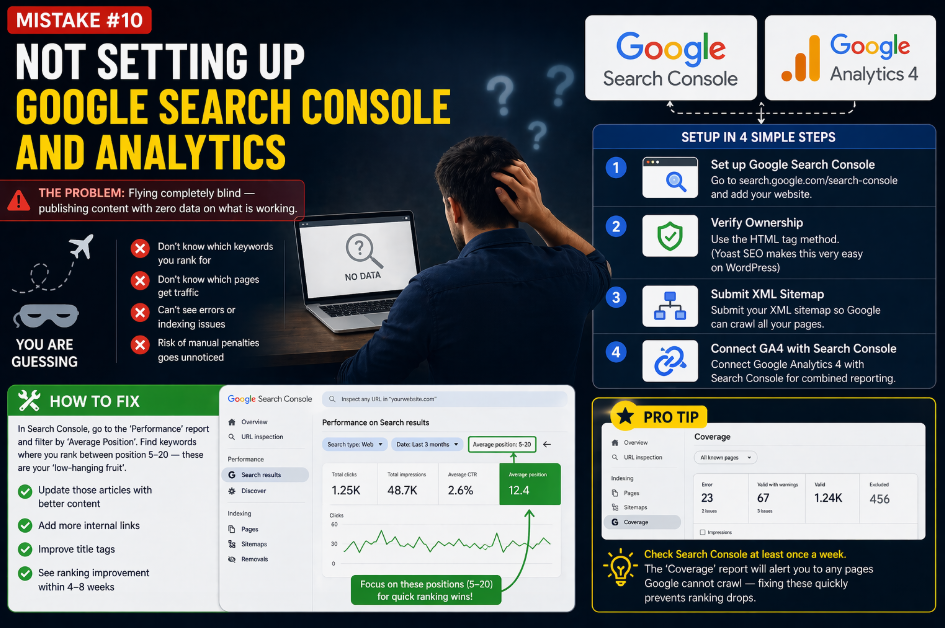
- Set up Google Search Console: go to search.google.com/search-console and add your website
- Verify ownership using the HTML tag method (Yoast SEO makes this very easy on WordPress)
- Submit your XML sitemap in Search Console so Google can crawl all your pages
- Set up Google Analytics 4 and connect it to Search Console for combined reporting
How to Fix It: In Search Console, go to the ‘Performance’ report and filter by ‘Average Position.’ Find keywords where you rank between position 5–20 — these are your ‘low-hanging fruit.’ Update those articles with better content, more internal links, and improved title tags, and you will often see a ranking improvement within 4–8 weeks.
Pro Tip: Check Search Console at least once a week. The ‘Coverage’ report will alert you to any pages Google cannot crawl — fixing these quickly prevents ranking drops.
Read Also:- Off-Page SEO 2026: Backlinks, Authority & More (Advanced, Human-Centric Guide)
Mistake #11: Skipping Image Optimisation
The Problem: Uploading raw, unoptimised images with no alt text and massive file sizes.
Images impact your SEO in three ways: file size affects page speed, alt text helps Google understand what the image shows, and a properly named image file can even rank in Google Images (which drives additional organic traffic). Most beginners ignore all three. They upload a 4MB DSLR photo straight from their phone, name it something like ‘IMG_20241201.jpg,’ and leave the alt text field completely blank. This slows down the page, misses an SEO opportunity, and makes the content inaccessible to visually impaired users who use screen readers.
- Always compress images before uploading — aim for under 100KB per image
- Name image files descriptively: ‘seo-mistakes-2026.jpg’ beats ‘image1.jpg’
- Write descriptive alt text that explains what the image shows (e.g., ‘screenshot of Google Search Console performance report’)
- Use next-gen image formats like WebP for smaller file sizes with the same quality
- Use lazy loading so images only load when a user scrolls to them
How to Fix It: Install the ShortPixel or Smush plugin on WordPress to automatically compress all images — including your existing ones. Set alt text for every image in your media library. This is a one-time cleanup that can meaningfully improve both page speed scores and accessibility.
Pro Tip: Google Image Search accounts for roughly 22% of all web searches globally. Properly optimised images with descriptive alt text and filenames give you a chance to capture this additional traffic source.
Mistake #12: Publishing and Forgetting (Not Updating Old Content)
The Problem: Treating blog posts as permanent fixtures that never need revisiting once published.
SEO is not a ‘set it and forget it’ strategy. The internet changes constantly — statistics become outdated, competitors publish better articles, new information emerges, and Google updates its algorithm. An article you wrote in 2023 or 2024 may have ranked brilliantly at the time, but if you have not touched it since, it might be losing ground right now. Google actively prefers fresh, up-to-date content, especially for topics where recency matters (like our 15 SEO mistakes in 2026 guide).
- Audit your top 20 articles every 6 months using Google Search Console
- Update statistics, examples, and screenshots to reflect the current year
- Add new sections covering topics that have emerged since the original publication
- Update the publication date only after making substantial changes (not just cosmetic edits)
- Add internal links to newer related articles you have published since the original
How to Fix It: Sort your Google Search Console ‘Performance’ report by ‘Impressions’ and filter for the past 3 months vs the previous period. Any page showing a significant drop in impressions likely needs a content refresh. Update it, resubmit it for indexing via Search Console, and watch the recovery happen.
Pro Tip: Updating an old article often produces faster ranking improvements than writing a brand new one — because the old page already has backlinks, indexing history, and some existing authority.
Mistake #13: Having Duplicate Content on Your Website
The Problem: Multiple pages on your own website competing against each other with similar or identical content.
Duplicate content confuses Google. When two or more pages on your site contain nearly the same content, Google does not know which one to rank — so it often ranks neither, or picks the wrong one. Common causes include: product pages with nearly identical descriptions, blog posts on very similar topics, tag pages and category pages generating duplicate archive content, or HTTP vs HTTPS versions of pages both being indexed. Some e-commerce sites inadvertently create hundreds of duplicate pages through URL parameters (like filters and sorting options), and they wonder why none of their product pages rank well.
Read Also:- Best Free SEO Tools in the USA 2026: Keyword Research, Site Audit & Website Ranking
- Use canonical tags to tell Google which version of a page is the ‘master’ version
- Consolidate thin or similar blog posts into one comprehensive article
- In WordPress, set tag pages and author archive pages to ‘noindex’ using Yoast or Rank Math
- Ensure your site only loads on one URL (either www or non-www, and either HTTP or HTTPS — not both)
- For e-commerce, use URL parameters configuration in Google Search Console
How to Fix It: Run your site through Siteliner.com — it is a free tool that finds duplicate content across your website in minutes. For each issue found, either consolidate the duplicate pages into one, rewrite the content to make it unique, or add canonical tags pointing to the preferred version.
Pro Tip: Google’s John Mueller has confirmed that duplicate content by itself does not result in a manual penalty — but it does dilute your rankings and wastes Google’s crawl budget on your site.
Mistake #14: Not Focusing on E-E-A-T (Experience, Expertise, Authority, Trust)
The Problem: Publishing content with no clear author, no credentials, and no signals of real-world expertise.
In 2024 and beyond, Google introduced and refined E-E-A-T (Experience, Expertise, Authoritativeness, and Trustworthiness) as a core part of how it evaluates content quality. This matters most in what Google calls YMYL topics (Your Money or Your Life) — health, finance, legal advice, and anything that could significantly impact someone’s life. But in 2026, E-E-A-T signals affect virtually all competitive niches. A blog with no author bio, no ‘About’ page, no contact information, and no real-world credentials is treated with deep suspicion by Google’s quality raters and algorithms.
- Add a detailed author bio to every blog post — include real name, credentials, and relevant experience
- Create a comprehensive ‘About Us’ page that explains who you are and why you are qualified to write on your topic
- Include a contact page with a real address, email, and phone number
- Add references and cite credible sources (government sites, research papers, industry studies)
- Collect and display genuine customer reviews and testimonials
How to Fix It: If you are writing about digital marketing, your author bio should mention your years of experience, clients you have worked with, certifications you hold, or results you have achieved. Add a professional headshot. Link your bio to your LinkedIn profile. These signals tell both Google and readers that a real, qualified human wrote this content — not an AI generator or content farm.
Pro Tip: Google’s Search Quality Rater Guidelines (a free public document) explain exactly how human reviewers evaluate content quality. Reading it gives you a massive insight into what Google values.
Mistake #15: Giving Up Too Early
The Problem: Abandoning SEO after 2–3 months because rankings have not shot up.
This is the final and perhaps the most damaging mistake on this entire list. SEO is a long game. Always has been, always will be. Unlike paid advertising where you can see results the same day you launch a campaign, SEO takes time — typically 3–6 months to see meaningful movement, and 6–12 months to see the full impact of your work. This timeline feels brutally slow when you are in the middle of it. But here is the crucial difference: the traffic you build through SEO is compound. A great article you wrote today can drive consistent, free traffic for the next 5–10 years. Paid ads stop the moment you stop paying.
- Set realistic expectations: month 1–2 is groundwork, month 3–4 is early signals, month 5–6 is when momentum builds
- Track leading indicators, not just rankings: Are impressions growing? Is your site getting indexed faster? Are you earning any backlinks?
- Celebrate small wins: ranking for even a low-volume keyword proves your strategy is working
- Stay consistent: publish at least 2–4 quality articles per month and build 2–4 backlinks per month
How to Fix It: Create a simple tracking spreadsheet: list your 20 target keywords, note their starting rank, and check them monthly. You will often notice gradual improvement that is invisible day-to-day but dramatic when you look at a 6-month span. That data is what keeps you motivated when progress feels slow.
Pro Tip: The businesses that dominate organic search in 2026 are not necessarily the ones with the biggest budgets — they are the ones that started 12–18 months ago and never stopped.
Final Thoughts — Now You Know, So Take Action
We have covered all 15 SEO mistakes in 2026 that are silently holding websites back. Let’s quickly recap what we covered:
- Ignoring search intent and targeting keywords that are too competitive
- Publishing thin, low-quality content and neglecting title tags
- Slow website speed, poor mobile optimisation, and missing backlinks
- Broken internal linking, keyword stuffing, and skipping analytics setup
- Unoptimised images, stale content, and duplicate page issues
- Missing E-E-A-T signals and giving up before SEO has time to work
Here is the most important thing to understand: you do not need to fix all 15 mistakes overnight. Pick the top 3 that apply most to your website right now and start there. SEO is a process of continuous improvement, not a one-time task. Every small fix you make compounds over time into significant ranking gains.
The difference between websites that dominate Google in 2026 and websites that struggle is not intelligence or budget — it is consistency and awareness. You now have the awareness. The consistency is up to you.
Your Action Plan: Open Google Search Console today. Check your top 10 pages. Pick one mistake from this list that applies to your best-performing page. Fix it this week. Measure the impact over the next 30 days. Repeat.