How to Make Money with Notion AI in 2026:- The way people earn money online is changing fast in 2026. Skills that once required years of experience can now be started much faster with the help of AI tools. One of the most practical tools for beginners is Notion AI.

Many people hear about online income but feel overwhelmed. They see hundreds of options, confusing advice, and unrealistic promises. The truth is simpler: if you can help people save time, stay organized, or create content faster, there is money to be made. That is exactly where Notion AI becomes useful.
This guide explains realistic ways beginners can use Notion AI to earn money in 2026, even if they are starting from zero.
What Is Notion AI?
Notion AI is an AI-powered assistant built inside Notion, a popular productivity platform used for notes, planning, databases, team collaboration, and workflows.
Instead of doing everything manually, Notion AI helps users:
- Write faster
- Summarize long text
- Brainstorm ideas
- Build systems and templates
- Organize projects
- Improve workflows
In simple words, Notion AI helps turn messy ideas into useful systems.
That is valuable because people and businesses are willing to pay for better organization and saved time.
Can You Really Make Money with Notion AI in 2026?
Yes, but not in the way many people expect.
Notion AI does not automatically deposit money into your account. It is a tool. Income comes when you use that tool to create something helpful or solve a problem for someone else.
For example:
- A student buys your planner template
- A freelancer hires you to build a client dashboard
- A business pays for documentation systems
- A creator buys your content planning workspace
This means beginners can absolutely earn, but results come through skill, consistency, and smart offers.
Why Notion AI Is a Smart Opportunity for Beginners
Starting something new online can feel complicated, especially when most advice makes it sound like you need advanced skills, expensive tools, or years of experience. That is one reason many beginners are paying attention to Notion AI in 2026.
It offers a practical starting point for people who want to build a skill, create digital products, or offer services without taking major financial risks. Instead of chasing every new trend, beginners can focus on something useful that businesses and individuals already need: better organization, faster workflows, and clearer systems.
Here is why Notion AI stands out.
Low Startup Cost
Many online opportunities require paid software, ad budgets, premium courses, or expensive hardware before you even begin. That creates pressure, especially for beginners who are still learning.
Notion AI is different because you can start small. A laptop or smartphone with internet access is enough for learning the basics, building sample projects, and creating your first offers.
This matters because beginners should spend more time learning and practicing than worrying about large upfront costs. Keeping expenses low also gives you room to experiment without feeling trapped.
Beginner Friendly Learning Curve
Some tools are powerful but difficult to understand. If a beginner opens them and feels lost in the first hour, they often quit early.
Notion AI is more approachable. Its layout is simple, and many tasks feel intuitive once you understand pages, templates, and databases. The AI features also reduce friction by helping with writing, planning, brainstorming, and structuring information.
You do not need to know coding. You do not need advanced design skills. You can improve step by step.
That makes progress easier, and easier progress usually leads to consistency.
Real Market Demand
Many beginners choose ideas that sound exciting but have no real demand. That creates frustration because effort does not turn into income.
Notion AI connects to real problems people already pay to solve.
Examples include:
- Businesses needing better internal systems
- Freelancers wanting client dashboards
- Students looking for study planners
- Content creators managing schedules
- Teams organizing projects and deadlines
When a tool helps solve existing pain points, it becomes easier to build offers people care about.
Remote Work Friendly
In 2026, flexibility matters more than ever. Many people want income options they can manage from home or alongside studies, jobs, or family responsibilities.
Read Also:- 7 Best Earning Tips from Grammarly’s Business Model
With Notion AI, much of the work can be done remotely:
- Building templates
- Creating planning systems
- Writing content drafts
- Managing client workspaces
- Selling digital products online
This means location is less of a barrier. A beginner can build and sell to clients in different cities or countries without needing a physical office.
Repeat Income Potential
Time-for-money work has value, but scalable income often comes from products that can be sold more than once.

This is where Notion AI becomes interesting.
A useful template created once can be sold many times. A planner, CRM system, or content dashboard may continue generating income after the original work is finished.
That does not mean passive income happens instantly. It still requires quality, trust, and promotion. But the model gives beginners a path beyond one-time tasks.
Helps Build Valuable Skills Beyond One Tool
Even if someone eventually moves beyond Notion AI, the skills learned are still useful.
You may improve in areas like:
- Organization
- Workflow design
- Client communication
- Productivity systems
- Content creation
- Problem solving
These skills transfer into freelancing, business operations, consulting, and other digital careers.
So even small early projects can create long-term value.
Less Hype, More Practical Use
Many online trends rise quickly and disappear just as fast. Beginners often lose time chasing methods that depend more on hype than usefulness.
Notion AI is different because it sits inside everyday work: planning, writing, organizing, managing tasks, and running systems.
That practical foundation gives it stronger staying power than many short-lived trends.
20 Best Ways to Make Money with Notion AI in 2026
Notion AI is more than a writing tool. It can help beginners create products, deliver services, and solve everyday business problems. The strongest earning opportunities usually come from helping people save time, stay organized, or work more efficiently.
Below are 20 practical ideas explained in detail so you can understand how each one can become a real income stream in 2026.
Template Selling Ideas
1. Student Planner Templates
Students often struggle with deadlines, scattered notes, revision pressure, and exam schedules. A well-designed student planner can bring everything into one place.
You can create templates with:
- Class schedules
- Assignment trackers
- Exam countdowns
- Daily study goals
- Notes database
- Revision timetable
This type of template sells well because it solves stress and helps students stay focused.
2. Habit Tracker Templates
Many people want better routines but fail because they track progress inconsistently. A habit tracker gives structure and accountability.

Popular categories include:
- Gym progress
- Reading habits
- Morning routines
- Meditation streaks
- Water intake
- Sleep consistency
Simple systems often perform better than overly complicated ones.
3. Personal Finance Templates
Money management remains a strong niche in 2026. People want clarity around spending, saving, and financial goals.
Read Also:- How to Make Money with Copy.ai in 2026
Useful features include:
- Monthly budget planner
- Expense categories
- Savings goals tracker
- Debt repayment plan
- Subscription tracker
- Income dashboard
Finance templates sell because they offer control during uncertain times.
4. Freelancer CRM Templates
Freelancers need better systems as they grow. Many lose track of leads, payments, and deadlines.
A CRM template can include:
- Client database
- Proposal tracker
- Invoice status
- Meeting notes
- Follow-up reminders
- Revenue overview
This is especially valuable for designers, writers, marketers, and consultants.
5. Content Calendar Templates
Creators often manage content across multiple platforms. A clear planning system saves time and prevents inconsistency.
Include sections for:
- Monthly calendar
- Content ideas bank
- Draft status
- Publishing schedule
- Brand partnerships
- Analytics notes
Creators on YouTube, blogs, podcasts, and social media need this regularly.
6. Job Search Templates
Job seekers often feel overwhelmed by multiple applications and interview processes.
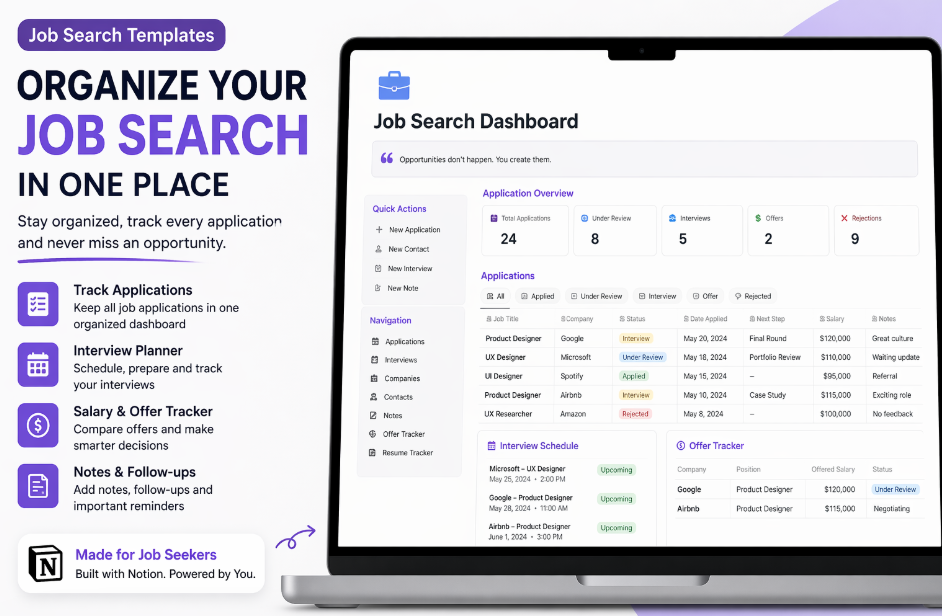
Helpful sections:
- Applied jobs list
- Resume versions
- Follow-up dates
- Interview notes
- Salary comparisons
- Networking contacts
A clean template can save hours and reduce frustration.
7. Wedding Planning Templates
Weddings involve many moving parts, and couples often want better organization.
Build systems for:
- Budget management
- Guest lists
- Vendor contacts
- Timelines
- Task checklists
- Seating ideas
This niche works because people happily pay for stress reduction during major life events.
8. Startup Dashboard Templates
New founders need visibility into tasks and growth priorities.
Useful areas:
- Weekly goals
- KPIs
- Product roadmap
- Team tasks
- Investor updates
- Hiring pipeline
Startups value systems that help them stay organized while growing fast.
9. Real Estate Lead Templates
Agents and brokers need consistent lead follow-up to close deals.
Your template can include:
- Buyer and seller leads
- Call logs
- Property preferences
- Appointment reminders
- Status stages
- Referral tracker
This niche has strong earning potential because closed deals can be high value.
10. Client Portal Templates
Freelancers and agencies can offer premium portals where clients access updates, files, timelines, and communication.
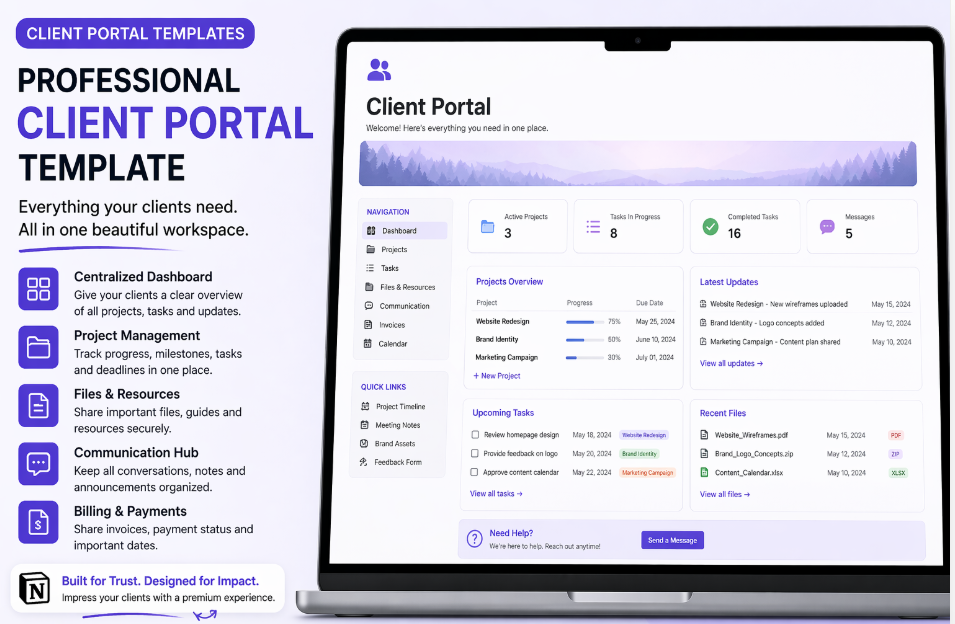
Sections may include:
- Welcome dashboard
- Project milestones
- Shared files
- Task status
- Meeting notes
- Payment reminders
This adds professionalism and helps justify higher pricing.
Service Based Income Ideas
11. Notion Workspace Setup Service
Some clients know they need systems but do not want to build them.
You can charge to create custom setups such as:
- Business operations hub
- Team workspace
- Freelancer dashboard
- Sales pipeline
- Content systems
You save them time, and time is valuable.
12. Company Wiki Setup
Many companies lose knowledge because documents are scattered.
A company wiki centralizes:
- Policies
- Training material
- SOPs
- Team directories
- Process guides
- FAQs
In 2026, remote and hybrid teams rely heavily on searchable internal systems.
Read Also:- Top 7 Ways to Make Money with Jasper AI in 2026
13. Team Project Management Setup
Businesses need clarity on who is doing what and by when.
You can build:
- Task boards
- Department workflows
- Timelines
- Sprint planning boards
- Approval systems
- Progress dashboards
This is a practical B2B service with repeat client potential.
14. Productivity Systems for Professionals
Executives, founders, and consultants are busy but disorganized.
Offer personal systems for:
- Daily planning
- Priority management
- Goal tracking
- Meeting notes
- Reading lists
- Follow-up reminders
People often pay well for systems that reduce mental clutter.
15. SOP Documentation Service
Standard Operating Procedures help businesses run smoothly.
Use Notion AI to speed up first drafts, then refine professionally.
Examples:
- Hiring process
- Customer support steps
- Sales onboarding
- Content publishing workflow
- Invoice procedure
As automation grows in 2026, clear processes become more valuable.
AI Content Income Ideas
16. Blog Writing Services
Many brands need articles but lack time.
Use Notion AI for:
- Research outlines
- Draft structure
- Headline ideas
- FAQ generation
- Content planning
Then add human editing and strategy before delivery.
17. Social Media Caption Packs
Small businesses often need content but struggle with daily writing.

Sell monthly bundles such as:
- 30 Instagram captions
- Launch campaign captions
- Product promo copy
- Story prompts
- Call-to-action ideas
Recurring monthly packages can create stable income.
18. Email Newsletter Writing
Email remains powerful in 2026, but many creators and businesses do not write consistently.
Offer:
- Weekly newsletters
- Product launch emails
- Welcome sequences
- Promotional campaigns
- Audience engagement emails
Reliable newsletter writers are valuable because email drives revenue.
19. Ebook Creation
You can create simple digital guides using Notion AI for outlines and drafts.
Examples:
- Beginner budgeting guide
- Productivity playbook
- Student study guide
- Freelancing starter kit
- Wellness routine planner
Sell through platforms like Gumroad.
20. Prompt Packs for Notion AI Users
Many users want better results but do not know what prompts to use.
Create prompt collections for:
- Students
- Marketers
- Freelancers
- Coaches
- Content creators
- Job seekers
A good prompt pack saves time and increases results, which makes it sellable.
How to Choose the Best One for You
If you like design:
- Templates
- Dashboards
- Client portals
If you like writing:
- Blogs
- Emails
- Caption packs
If you like systems:
- Workspace setup
- Company wikis
- SOP services
If you like scalable products:
- Templates
- Ebooks
- Prompt packs
Best 5 Ideas for Complete Beginners
Read Also:- How to Earn Money from DeepSeek? New Income Ways in 2026
If you are starting fresh, begin with these:
- Student planner templates
- Habit tracker templates
- Caption writing packs
- Blog writing services
- Workspace setup service
These are easier to learn and can bring first sales faster.
How to Start with Zero Experience
Many beginners delay action because they think they need mastery first. You do not.
Step 1: Learn the Basics
Understand pages, databases, templates, and views inside Notion.
Step 2: Use Notion AI Daily
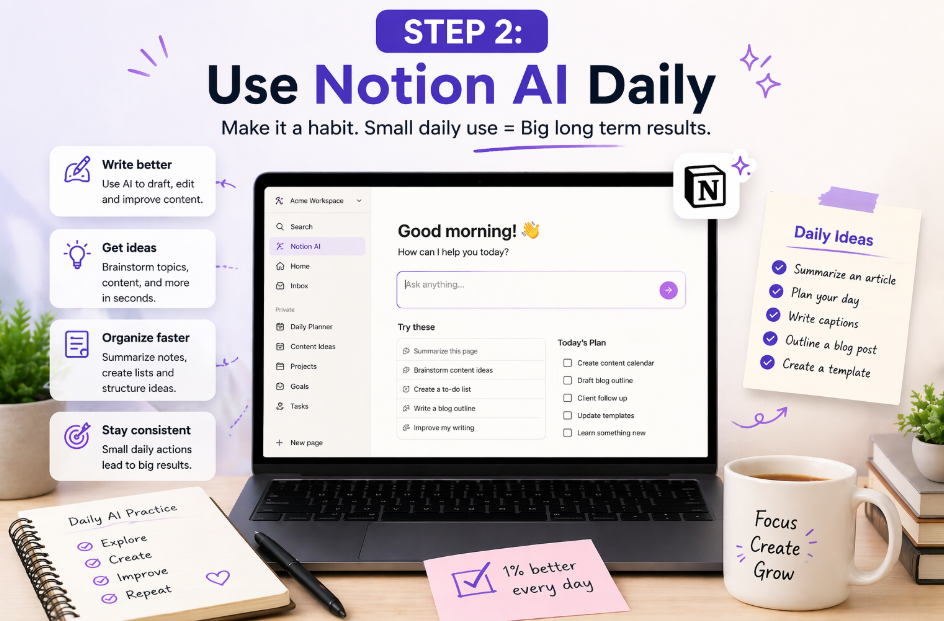
Practice summarizing text, generating ideas, organizing notes.
Step 3: Build 3 Demo Projects
Examples:
- Student planner
- Business dashboard
- Freelancer CRM
Step 4: Create a Portfolio
Show screenshots, use cases, and outcomes.
Step 5: Start Selling
Offer services or products online.
Where to Sell Your Work
You can start on:
- Fiverr
- Upwork
- Gumroad
You can also grow through personal branding on social media.
Realistic Income in 2026
Beginner Stage
Small sales, first clients, side income.
Intermediate Stage
Regular monthly clients and repeat buyers.
Advanced Stage
Premium services, product bundles, subscriptions.
The first ₹5,000 often teaches more than reading 50 motivational posts.
Mistakes to Avoid
Copying Other Sellers
Templates without originality rarely grow.
Trusting AI Too Much
Always improve wording, design, and usefulness.
Ignoring Marketing
Even great products need visibility.
Offering Too Many Services
Start with one niche and build trust.
Quitting Early
Most people stop before momentum starts.
A Human Truth Most Guides Ignore
Your first month may feel slow.
You may post products and hear nothing. You may send proposals without replies. That is normal.
Every online skill feels uncertain in the beginning.
What matters is not instant success. What matters is building something real week after week.
A simple planner that helps 10 people is better than 100 ideas never launched.
Read Also:- Make Money with Grok AI 2026–2027: Complete Future-Proof Income Guide
Final Thoughts
In 2026, Notion AI is not just a productivity tool. It can become a real earning skill for beginners who use it wisely.
You do not need to be an expert designer or famous creator. You need to solve problems people already have:
- confusion
- poor planning
- messy workflows
- slow content creation
- lack of organization
Start with one idea. Improve it every week. Keep showing your work.
That is how beginners turn tools into income.