Google Tag Manager Benefits:- Digital marketing in 2026 is no longer limited to running ads or driving traffic. The ecosystem has evolved into a data-first, privacy-focused, automation-driven environment where every click, scroll, and interaction matters. Businesses that truly understand and control their data are the ones leading the market, while others struggle with guesswork and inaccurate insights.

In this data-driven era, Google Tag Manager (GTM) has become more than just a helpful tool—it has become a core infrastructure requirement for modern websites.
Whether you are a small business owner, blogger, e-commerce brand, SaaS startup, or a digital marketing agency, operating without Google Tag Manager in 2026 means slower growth, weaker insights, and wasted marketing spend.
This article explores what Google Tag Manager is, how it works, why it is more powerful than ever in 2026, and how it directly impacts SEO, paid ads, analytics, and business growth.
What Is Google Tag Manager? (Simple Explanation for 2026)
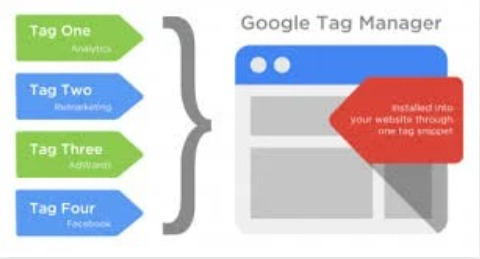
Google Tag Manager is a free tag management system by Google that allows you to manage and deploy tracking codes (called tags) on your website or mobile app without directly editing the website’s source code every time.
In simple terms:
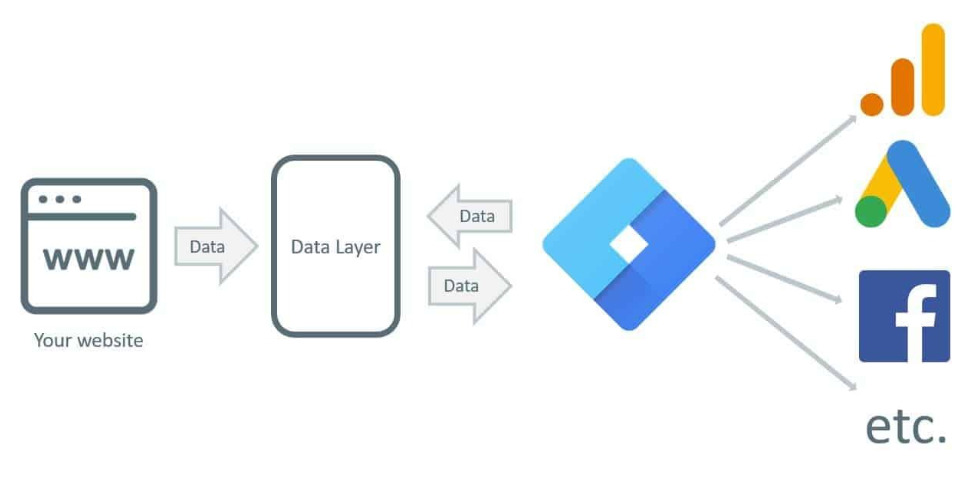
Google Tag Manager acts as a bridge between your website and all your marketing, analytics, and tracking tools.
Using GTM, you can centrally manage tools such as:
- Google Analytics 4 (GA4)
- Google Ads conversion tracking
- Meta (Facebook & Instagram) Pixel
- LinkedIn Insight Tag
- Twitter (X) tracking
- Hotjar, Microsoft Clarity, and other UX tools
- Custom HTML and JavaScript tracking
Instead of asking a developer to add or modify code repeatedly, marketers gain direct control over tracking and measurement, making campaigns faster, smarter, and more flexible.
Why Google Tag Manager Is More Important Than Ever in 2026
The importance of GTM has multiplied due to major shifts in technology, privacy laws, and user behavior.
1. The Privacy-First Internet Era
By 2026, third-party cookies are almost obsolete. Browsers, operating systems, and governments worldwide are enforcing stricter data privacy regulations.
Google Tag Manager plays a crucial role in:
- First-party data collection
- Consent-based tracking
- Server-side tagging
- Compliance with GDPR, CCPA, and future privacy frameworks
Without GTM, adapting to these changes becomes technically complex and costly.
2. GA4 and Event-Based Measurement Are the New Standard
Universal Analytics is history. GA4 operates entirely on an event-based data model, meaning every interaction is an event.
Google Tag Manager is practically essential for:
- Creating custom GA4 events
- Tracking meaningful user actions
- Sending clean, structured data
- Avoiding bloated or inaccurate analytics reports
In 2026, GA4 + GTM is the default analytics setup, not an option.
Read Also:- Digital Marketing Trends 2026: Complete Future Guide for Businesses, Agencies & Marketers
3. Faster Decisions in a Real-Time Marketing World
Marketing success in 2026 depends on speed and adaptability.
With GTM, marketers can:
- Launch new tracking instantly
- Test new events without code changes
- Optimize campaigns in real time
- Respond faster to user behavior trends
Businesses that rely on manual code deployment simply cannot keep up.
How Google Tag Manager Works: A Conceptual Understanding
Google Tag Manager (GTM) is a smart tool that helps you efficiently manage tracking codes on your website or app. Unlike simple page-load tracking, GTM collects data based on actual user behavior, giving marketers more accurate insights to make better decisions.
GTM works around three core components: Tags, Triggers, and Variables. Let’s break them down:
1. Tags
Tags are small snippets of code that send information from your website to third-party tools such as:
- Google Analytics 4 (GA4)
- Google Ads
- Meta Pixel (Facebook Pixel)
- Custom tracking systems
Purpose: Tags tell these tools what to track and when.
Example:
- A “Buy Now” button click can trigger a tag that sends the data to GA4.
- Submitting a contact form can trigger a conversion tracking tag.
Simple terms: Tags are the messengers that send your data to analytics tools.
2. Triggers
Triggers define when a tag should fire. Without triggers, a tag would either fire all the time or never fire at all.
With GTM, you can define specific user actions, such as:
- Page views (when a user visits a page)
- Button clicks (e.g., “Add to Cart”)
- Form submissions
- Scroll depth (how far a user scrolls on a page)
- Video interactions (play, pause, or 50% watched)
- Custom user actions
Example: A conversion tag will only fire after a visitor completes a checkout, not just when they browse a product page.
Simple terms: Triggers are rules that decide when a tag should run.
3. Variables
Variables store additional information that tags or triggers may need. They allow GTM to track dynamic values that change depending on user behavior.
Common examples:
- Page URL (which page was visited)
- Button text (which button was clicked)
- Form ID (which form was submitted)
- Click classes (specific HTML elements clicked)
- Custom user-defined values
Simple terms: Variables are extra details that guide your tags and triggers.
How Tags, Triggers, and Variables Work Together
When combined, these three components create an intelligent, behavior-driven tracking system:
- User takes an action → Trigger detects it
- Tag fires → Sends data to analytics or marketing tools
- Variable provides extra context → Ensures accurate and detailed tracking
This system provides marketers with rich, accurate, and actionable insights that simple page-load tracking can’t offer.
Top Google Tag Manager Benefits in 2026
In 2026, digital marketing demands precision, speed, and flexibility. GTM is no longer optional—it’s essential for anyone serious about data-driven growth. Here’s why:
1. No-Code Tracking Management
Marketers today are strategists, not coders. GTM empowers marketing teams to implement complex tracking without writing a single line of code.
With GTM, you can easily track:
Read Also:- Online Course Selling Program: Learn Digital Marketing to Sell Courses Successfully
- Button clicks
- Form submissions
- Scroll depth and engagement
- Video views and progress
- File downloads
- Exit intent behavior
Benefit: Marketing teams become independent, reducing dependency on developers and speeding up campaigns.
2. Massive Time and Cost Savings
Traditionally, adding or modifying tracking required:
- Developer time
- Code deployment
- Testing and debugging
- Delays in campaign launches
With GTM:
- Campaigns launch faster
- Marketing teams can make real-time changes
- Costs drop significantly
- A/B testing becomes easier
For growing businesses, this efficiency can be a game-changer.
3. Improved Data Accuracy and Reliability
Poor tracking leads to wrong decisions. GTM ensures your data is clean, reliable, and actionable:
- Preview & Debug mode lets you test tags before they go live
- Controlled firing conditions prevent duplicate or incorrect data
- Structured event setup ensures consistency across pages
Result: You get high-quality, decision-ready insights, not misleading reports.
4. Better Website Performance and Speed
Website speed is a critical factor in 2026 for:
- SEO rankings
- User experience
- Conversion optimization
GTM loads tags asynchronously and supports optimization strategies like:
- Tag sequencing (firing critical tags first)
- Conditional loading (tags fire only when needed)
- Removing unused or outdated tags
This ensures your website remains fast and responsive, even with multiple tracking tools running in the background.
5. Advanced Event and Conversion Tracking
GTM enables deep funnel analysis, including:
- Add-to-cart tracking
- Checkout step analysis
- Lead form drop-offs
- CTA performance tracking
- Micro-conversions that indicate intent
These insights help businesses increase ROI without increasing ad spend.
6. Version Control and Error Recovery
One of GTM’s most underrated features is version control.
In 2026’s complex marketing stacks:
- Mistakes happen
- Experiments fail
- Changes need rollback
GTM allows you to restore previous versions instantly, protecting your data integrity.
7. Secure Team Access and Collaboration
Large teams need controlled access.
Google Tag Manager offers:
- User-level permissions
- Read-only, edit, and publish roles
- Secure collaboration for agencies and enterprises
This ensures data safety while allowing teamwork.
Google Tag Manager for SEO in 2026
SEO is no longer just about keywords and backlinks. User behavior and engagement signals matter more than ever.
GTM enhances SEO by enabling:
- Scroll tracking to measure content engagement
- Click tracking for internal link optimization
- CTA performance analysis
- Form interaction insights
Smart SEO professionals use GTM to connect user behavior with ranking improvements.
Google Tag Manager for Paid Ads and Remarketing
If you run paid ads in 2026, GTM is a revenue amplifier.
It allows:
- Accurate Google Ads conversion tracking
- Advanced Meta Pixel event setup
- Custom remarketing audiences
- Funnel-based ad optimization
- Cross-platform performance consistency
Better tracking means better ROAS and lower cost per acquisition.
Google Tag Manager vs Manual Code Implementation: The 2026 Reality
In the past, adding tracking to a website was a developer-heavy process. Every new analytics tag, conversion pixel, or remarketing script meant editing your website’s code manually. While this worked, it came with a host of challenges that slow down modern marketing efforts.
Here’s a detailed comparison:
Read Also:- Email Marketing in 2026: A Must-Have Growth Tool for Businesses
Manual Tracking: Challenges in 2026
- Slow Implementation
Each new tracking requirement—like a button click, form submission, or video interaction—requires a developer to add custom code. This slows down campaigns and A/B testing. By the time tracking is live, your marketing opportunity may already be lost. - Error-Prone Process
Manual code changes often introduce errors—broken scripts, missing tags, or wrong trigger conditions. These errors can result in incomplete or inaccurate data, causing businesses to make decisions based on false insights. - Developer-Dependent
Marketing teams can’t act independently. Every minor update, test, or new campaign requires developer involvement, creating bottlenecks and delaying results. - Hard to Scale
As your website grows or campaigns multiply, manually managing dozens or hundreds of tags becomes chaotic. Keeping track of which tags are active, which pages they fire on, or which triggers are linked becomes nearly impossible without a systematic approach. - Difficult to Debug and Test
Finding mistakes in a maze of manually implemented scripts is time-consuming. Testing changes before they go live often requires staging environments, which further slows down decision-making.
In short, manual tracking is slow, risky, and not suitable for the fast, data-driven marketing world of 2026.
Google Tag Manager: The Modern Solution
Google Tag Manager eliminates these challenges by providing a centralized, marketer-friendly platform to manage all tracking. Here’s why GTM is superior:
- Fast Deployment
New tags, triggers, or variables can be added and activated without touching the website code. For example, a new GA4 event for “video completion” can go live within minutes, allowing marketers to respond quickly to campaign insights. - Scalable System
GTM is designed to handle dozens or even hundreds of tags across multiple domains efficiently. Businesses can manage complex setups with ease, including cross-domain tracking, e-commerce funnels, and multi-platform campaigns. - Marketer-Friendly Interface
GTM’s intuitive UI allows marketers to add, edit, and manage tags without coding knowledge. This independence removes bottlenecks and empowers marketing teams to make fast, informed decisions. - Easy Testing and Debugging
The built-in Preview & Debug mode in GTM allows marketers to test tags, triggers, and variables in real-time before publishing. Errors can be detected immediately, ensuring data integrity. - Future-Ready
GTM is continuously updated to support emerging technologies, privacy standards, and tracking models. Features like server-side tagging, cookieless tracking, and AI-based event measurement make GTM a forward-compatible solution for 2026 and beyond.
Real-World Example: Manual vs GTM
Imagine you run an e-commerce website and want to track add-to-cart actions, checkout progress, and form submissions:
- Manual Tracking: You contact a developer, explain each event, wait for coding, testing, and deployment. If an error occurs, you go back and forth to fix it. By the time tracking is live, the campaign is already halfway through.
- GTM: You log into GTM, create triggers for each user action, link them to GA4 or Google Ads tags, test in Preview mode, and publish. Your tracking is live in minutes, ready to feed real-time insights into marketing dashboards.
The difference? GTM is fast, reliable, and scalable, while manual tracking is slow, error-prone, and stressful.
Why Manual Tracking Is Obsolete in 2026
By 2026, marketing is data-driven, fast-paced, and privacy-conscious. Businesses need tools that allow rapid implementation, precise measurement, and flexible experimentation.
Manual code-based tracking simply cannot keep up—it’s too slow, risky, and developer-dependent.
Google Tag Manager is no longer optional—it is the standard for modern tracking, measurement, and optimization. Businesses that embrace GTM gain a competitive advantage through accurate insights, faster decision-making, and scalable marketing infrastructure.
Common Google Tag Manager Mistakes Businesses Should Avoid
Even powerful tools can fail if misused. Common mistakes include:
- Publishing without testing
- Creating duplicate tags
- Ignoring naming conventions
- Leaving unused tags active
- Poor trigger logic
A professional GTM setup ensures long-term success and data accuracy.
The Future of Google Tag Manager Beyond 2026
The role of GTM will continue to expand with:
- Server-side tracking adoption
- AI-driven analytics
- Cookieless measurement models
- Deeper CRM and automation integrations
- Predictive event tracking
Businesses that invest early in GTM infrastructure will gain a long-term competitive advantage.
Final Thoughts
In 2026, Google Tag Manager is not just a marketing tool—it is the backbone of digital measurement.
If you want to:
- Understand your website visitors
- Improve conversions
- Optimize ad spend
- Build data-driven strategies
- Stay privacy-compliant
- Scale confidently
Google Tag Manager is non-negotiable.
Ready to Build a Smarter, Data-Driven Website?
Our professional Digital Marketing Services help businesses implement advanced GTM setups, accurate tracking, GA4 optimization, and conversion-focused analytics.
We don’t just bring traffic —
we build measurable, scalable, and profitable growth.
Contact us today and transform your website into a high-performing digital asset ready for 2026 and beyond.