Bluehost vs GoDaddy:- Choosing a web hosting provider in 2026 is not as easy as it looks. Every hosting company talks about fast speed, near-perfect uptime, and easy setup. But when you actually start checking plans, control panels, renewal prices, and hidden limits, things quickly become confusing.

Most people end up stuck between two big names: Bluehost and GoDaddy. These companies appear in almost every hosting comparison. They are widely used, well known, and backed by heavy marketing. Still, they are not built for the same type of users or the same website needs.
This article is for bloggers, WordPress users, content creators, startups, and small business owners who want clear answers instead of marketing promises. Here, we look at how Bluehost and GoDaddy perform in real situations, including speed, pricing over time, WordPress support, security features, customer support, and how well each option works as your website grows.
The goal is simple.
To help you choose a hosting service that supports better website speed, improves SEO, gives visitors a smooth experience, and helps your online work grow in 2026, instead of focusing only on a low starting price.
Quick Verdict (For Readers Who Want a Clear Answer)
If you want a straight answer without reading the full comparison, this section will help you decide quickly.
When Bluehost Makes More Sense
Bluehost works better if you are planning to build a website that depends on content, traffic, and long-term growth. It is especially useful for people who are starting with WordPress and want things to work smoothly without too much technical effort.
If you are a blogger, content creator, or someone running an SEO-focused website, Bluehost usually performs better in terms of speed, stability, and WordPress compatibility. The dashboard is designed in a way that makes it easier to manage WordPress, updates, and basic settings, even if you are not very technical.
Bluehost is also a better option if you are thinking long-term. As your website grows, you can upgrade plans without moving to a completely different hosting provider, which saves time and avoids future headaches.
When GoDaddy Is a Better Fit
GoDaddy is more suitable if your main need is domain management and a very simple website. Many users choose GoDaddy because they want everything in one place, such as domain, hosting, email, and basic site tools, without worrying much about performance tuning or advanced settings.
If you are running a small business website with only a few pages and low traffic, GoDaddy can be enough. It works well for users who want a simple setup and do not plan to do much customization or content expansion.

However, for content-heavy websites or users who want strong WordPress performance, GoDaddy may feel limited over time.
Overall Recommendation for 2026
For most users in 2026, Bluehost comes out as the better overall choice. The combination of better website performance, smoother WordPress experience, and stronger long-term value makes it more suitable for growing websites.
While GoDaddy is convenient for basic needs, Bluehost offers a more solid foundation if your goal is to build something that can grow over time instead of staying small.
If your focus is on growth, traffic, and future scalability, Bluehost is usually the safer and smarter choice.
Company Overview: Background and Positioning
Bluehost Overview
Bluehost has been in the web hosting industry since the early days of blogging and personal websites. Over the years, it has grown into a well-known hosting brand and is now part of a large global hosting group that manages millions of websites worldwide.
Instead of trying to offer every possible online service, Bluehost has taken a more focused approach. From the beginning, its main goal has been clear:
to make WordPress hosting simple and dependable, especially for people who are just starting or planning to grow their websites over time.
Bluehost is officially recommended for WordPress, and this shows in how its platform is designed. From installation to daily management, most tools are built around WordPress users. This makes it easier for beginners to set up their first site without dealing with complex technical steps.
How Bluehost Positions Itself
Bluehost focuses strongly on users who want to build real websites, not just register a domain and forget about it. Its services are designed for bloggers, content creators, startups, and small businesses that depend on website performance and stability.
Some key points that define Bluehost’s positioning include:
Strong WordPress integration that makes setup and management easier
A beginner-friendly dashboard that does not feel overwhelming
Hosting plans designed for blogs, content-driven sites, and small business websites
Infrastructure spread across multiple regions to support users from different locations
Unlike companies that try to combine hosting, domains, email, website builders, and marketing tools under one roof, Bluehost keeps its promise simple. It does not aim to be a full digital marketplace. Instead, it focuses on doing one main job well.
The core idea behind Bluehost is straightforward.
Give users a stable, easy-to-use WordPress hosting environment that supports website growth without unnecessary complexity.
This clear focus is one of the main reasons Bluehost continues to be a popular choice for WordPress-based websites in 2026.
Hosting Plans and Pricing Comparison (2026 Reality Check)
Pricing is one of the biggest reasons people regret their hosting choice later. Most users focus only on the low starting price, without checking what they will actually pay after the first year.
In 2026, looking at long-term cost is more important than choosing the cheapest plan on day one.
Bluehost Pricing Breakdown
Bluehost keeps its pricing structure simple and easy to understand. Plans are clearly divided based on the type of user and website needs.
Main hosting options include:
- Shared hosting for beginners and small websites
- Managed WordPress hosting for better performance and ease of use
- VPS and advanced plans for websites that are growing
This structure helps users avoid confusion while choosing a plan.

What works well with Bluehost pricing:
- Competitive entry-level pricing for new users
- Free domain and SSL included in most starter plans
- Clear difference between basic hosting and WordPress-focused plans
Important pricing reality:
- Introductory prices are lower, but renewal prices are higher
- This is common across the hosting industry
- Renewal pricing is visible if you check the terms before purchase
Bluehost offers better value when you:
- Choose a plan for one to three years
- Actively use the WordPress features included
- Plan for website growth instead of short-term use
GoDaddy Pricing Breakdown
GoDaddy often appears cheaper at first glance, which attracts many users. However, the base plans are quite limited.
What to expect from GoDaddy’s entry-level plans:
- Very basic hosting features
- Suitable for simple websites with low traffic
- Strong focus on domain and account management
Where GoDaddy pricing becomes tricky:
- Many useful features are sold as paid add-ons
- Email services, backups, and security often cost extra
- Performance upgrades are usually not included

Renewal pricing can feel confusing because:
- Initial discounts end quickly
- Add-ons renew separately
- The final yearly cost can be much higher than expected
Value for money perspective:
- Works for users who need a simple site and minimal features
- Less suitable for content-heavy or growth-focused websites
Overall Pricing Verdict for 2026
When real costs are compared, Bluehost usually offers better long-term value for most website owners.
- More features included from the start
- Fewer surprise add-on costs
- Easier to predict expenses over time
GoDaddy can still be useful for basic needs, but once you start adding features, the price often increases quickly.
For users planning to grow their website in 2026, Bluehost pricing feels more balanced and transparent.
Read Also:- Hostinger vs Bluehost (2026–2027): Which Web Hosting is the Best Choice for You?
Performance Comparison: Speed, Uptime, and Stability
Performance is not just a technical topic. It directly affects how your website performs in real life.
Poor hosting performance can lead to:
- Lower Google search rankings
- Higher bounce rates because visitors do not wait
- Fewer conversions and weaker user trust
In simple terms, slow hosting hurts both SEO and user experience.
Speed Analysis
Bluehost Speed Experience
Bluehost is built with WordPress performance in mind, which shows in everyday usage.
Bluehost speed highlights:
- Server configuration optimized for WordPress
- Built-in caching to reduce page load time
- CDN integration available for global visitors
- Stable performance for both US and Asia traffic
For content-heavy blogs and SEO-focused websites, Bluehost generally feels faster and more consistent.

GoDaddy Speed Experience
GoDaddy’s speed depends heavily on the hosting plan you choose.
GoDaddy speed reality:
- Entry-level plans can feel slow during traffic spikes
- Performance may drop as website load increases
- Speed improvements usually require paid upgrades
GoDaddy works fine for very simple websites, but speed limitations become noticeable for growing or content-driven sites.
Uptime and Stability
Both companies claim high uptime, but consistency is where the difference appears.
Bluehost uptime experience:
- Infrastructure designed with hosting stability as a priority
- Shared hosting performance is usually predictable
GoDaddy uptime experience:
- Manages a very large and diverse platform
- Shared hosting can occasionally feel less stable
For websites where uptime matters, fewer unexpected issues make a big difference.
WordPress Optimization and Ease of Use
Bluehost for WordPress
Bluehost is officially recommended by WordPress, and the experience reflects that.
Bluehost WordPress benefits:
- One-click WordPress installation
- WordPress pre-installed on many plans
- Clean and easy-to-use dashboard
- Beginner-friendly without limiting future growth
As your skills grow, the platform continues to support more advanced use without feeling restrictive.
GoDaddy for WordPress
GoDaddy also offers WordPress hosting, but the experience is more controlled.
GoDaddy WordPress experience:
- Customized dashboard designed for simplicity
- Advanced users may feel limited in control
- Performance and flexibility depend strongly on plan level
GoDaddy can work well for non-technical users, but it is less ideal for developers or SEO-focused creators.
Features Comparison: Core and Advanced
When choosing web hosting in 2026, features matter just as much as speed and price. Many users assume that all important features are included, but in reality, this is where hosting providers differ the most.
Let’s look at how Bluehost and GoDaddy compare when it comes to core and advanced features.
Free Domain
- Bluehost:
A free domain is included for the first year with most plans. This makes it easier for beginners to launch a website without extra upfront cost. - GoDaddy:
A free domain is often included, but usually with conditions such as longer contract terms or limited extensions.
Tip: Always check domain renewal prices. A free domain in the first year can become expensive later.

SSL Certificate
- Bluehost:
Free SSL is included by default, which is essential for website security, SEO, and user trust. - GoDaddy:
SSL is often sold separately or bundled into higher-priced plans.
Why this matters:
Google prefers secure websites. Without SSL, your site may show security warnings and rank lower in search results.
Read Also:- Top 10 B2B Lead Generation Tools in 2026 for Growth Teams
Email Hosting
- Bluehost:
Basic email hosting is included with most plans, which is useful for small businesses and personal websites. - GoDaddy:
Email services are often offered as a paid add-on.
Tip: If you need professional email addresses, check whether email is included before purchasing.
Backups
- Bluehost:
Offers limited free backups, which help protect your site against accidental data loss. - GoDaddy:
Backups are usually a paid add-on.
Important note:
Even limited backups are better than none. For serious websites, setting up regular backups is strongly recommended.
CDN (Content Delivery Network)
- Bluehost:
CDN integration is available and easy to set up, which helps improve website speed for visitors from different locations. - GoDaddy:
CDN access is limited unless you upgrade to higher plans.
Tip: A CDN is especially helpful if your visitors come from multiple countries.
Website Builder and Staging
- Bluehost:
Offers staging environments on WordPress plans, allowing you to test changes before making them live. - GoDaddy:
Focuses more on website builders, which are easy to use but less flexible for developers.
Who benefits more:
Staging is useful for bloggers, developers, and growing websites that need safe testing.
Features Summary
- Bluehost includes more essential features directly in its plans.
- GoDaddy often sells features individually as add-ons.
For users who want fewer surprises and better built-in value, Bluehost generally offers a more complete package.
Security Features (Critical in 2026)
In 2026, website security is not optional. Search engines, users, and payment platforms expect websites to meet basic security standards.
Bluehost Security Approach
Bluehost includes several important security features out of the box:
- Free SSL certificate
- Malware protection options
- Account isolation to reduce risk from other websites
- Regular WordPress updates for better security
This setup provides a solid security foundation, especially for beginners.
GoDaddy Security Approach
GoDaddy offers strong security tools, but they are usually priced separately:
- SSL and malware protection often require paid upgrades
- Security tools are modular, allowing customization but increasing cost
This approach works for users who want specific security tools, but it can increase overall expenses.
Security Verdict
From a trust, SEO, and ease-of-use perspective, Bluehost feels more secure right from the start. Most essential protections are already included, reducing setup effort and extra costs.
Final Tips Before Choosing
- Always check which features are included and which are paid add-ons
- Do not ignore SSL, backups, and security tools
- Choose hosting that protects your website by default, not after upgrades
Customer Support Comparison (Honest & Practical View)
Customer support is often ignored at the beginning, but it becomes extremely important when something goes wrong.
Bluehost Customer Support
Bluehost focuses more on guidance and problem-solving rather than selling during support interactions.
What works well with Bluehost support:
- 24/7 live chat and phone support
- Support agents trained specifically for WordPress
- Clear and helpful documentation for self-help
- Calm and solution-oriented communication
For beginners and WordPress users, Bluehost support generally feels patient and informative.

GoDaddy Customer Support
GoDaddy has a large and fast support system, especially for phone support.
Strengths of GoDaddy support:
- Strong phone support availability
- Quick response times
- Suitable for basic technical questions
Common concern:
- Support calls often include aggressive upselling
- Users may feel pressured to buy add-ons instead of getting direct solutions
This approach works for some users but can feel uncomfortable for others.
Support Verdict
If you value clear guidance without sales pressure, Bluehost usually offers a better support experience.
Scalability and Future Growth
Choosing hosting is not just about today. You need to think about where your website will be in 1–3 years.
Bluehost for Growth
Bluehost offers a smooth and logical growth path as your website traffic increases.
Bluehost scalability advantages:
- Easy upgrades to VPS and cloud hosting
- Minimal downtime during upgrades
- Smooth migration paths between plans
- Well-suited for growing blogs, startups, and businesses
You can start small and scale without changing providers.
GoDaddy for Growth
GoDaddy does allow scaling, but the process is less streamlined.
GoDaddy scalability reality:
- Scaling is possible but often complex
- Requires multiple plan changes
- Add-ons become necessary as traffic grows
This works, but long-term management can become expensive and confusing.
Growth Verdict
For business websites and long-term projects, Bluehost offers a cleaner and more predictable upgrade path.
Pros and Cons (Balanced and Honest)
Bluehost Pros
- Optimized specifically for WordPress
- More consistent performance
- Many essential features included by default
- Suitable for both beginners and advanced users
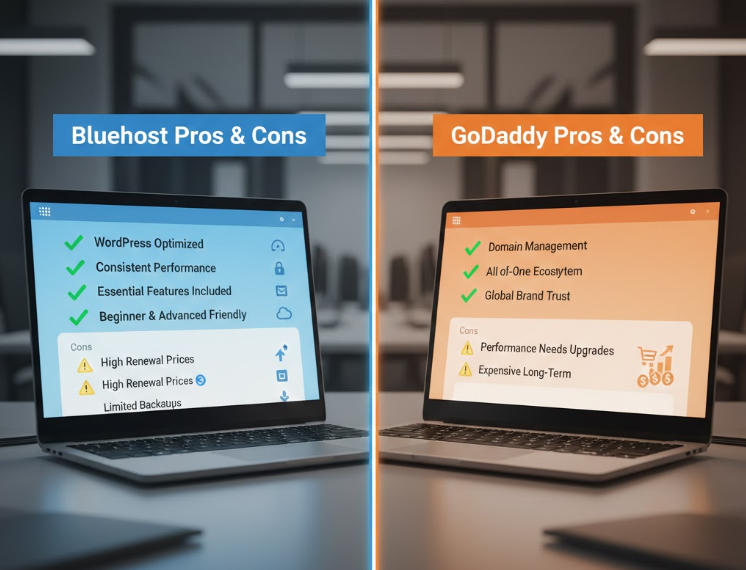
Bluehost Cons
- Renewal prices are higher than introductory offers
- Free backups are limited
GoDaddy Pros
- Excellent domain and DNS management
- All-in-one ecosystem (domains, email, hosting)
- Strong global brand trust
- GoDaddy Cons
- Heavy upselling during support and setup
- Performance depends heavily on upgrades
- Can become expensive in the long term
Bluehost vs GoDaddy: Comparison Table
| Feature | Bluehost | GoDaddy |
|---|---|---|
| Overall Value | High | Medium |
| Speed | Faster & stable | Variable |
| WordPress Support | Excellent | Average |
| Security | Included | Mostly add-ons |
| Customer Support | Helpful & guidance-focused | Sales-oriented |
| Best For | Bloggers, SEO, growing sites | Simple business websites |
Both Bluehost and GoDaddy are reliable companies, but they serve different types of users.
- Choose Bluehost if you want performance, WordPress optimization, SEO benefits, and long-term growth.
- Choose GoDaddy if you mainly need domain services or a very simple website with minimal customization.
For most users building something meant to grow in 2026, Bluehost provides a stronger and more balanced foundation.
Best Use Case Scenarios
Not every hosting provider is right for every user. The best choice depends on your goals, technical comfort, and long-term plans.
Choose Bluehost If:
Bluehost is a strong option when you are serious about building and growing a website over time.
Bluehost is ideal for you if:
- You are a beginner and want an easy, guided WordPress setup
- You are building a blog, niche website, or content-based platform
- SEO, speed, and website performance matter to you
- You want hosting that can scale as your traffic grows
- You prefer more built-in features instead of paid add-ons
Bluehost works best for users who plan to invest time and effort into long-term website growth.
Choose GoDaddy If:
GoDaddy focuses more on convenience and bundled services rather than performance optimization.
GoDaddy is suitable if:
- You want domain and hosting from the same provider
- You are creating a very simple website with limited pages
- You do not plan significant traffic growth
- You prefer an all-in-one dashboard with minimal customization
GoDaddy is better suited for basic online presence rather than performance-driven or SEO-focused projects.
Final Verdict: Which One Is Better in 2026?
Overall Verdict
For most users in 2026, Bluehost delivers stronger overall value.
Bluehost offers:
- More consistent performance
- Better WordPress optimization
- Cleaner and simpler upgrade paths
- Stronger SEO foundations
If you are building a website meant to grow, Bluehost provides better long-term reliability and flexibility.
GoDaddy still has its place, but it is more suitable for users who prioritize convenience over performance and scalability.
Frequently Asked Questions (SEO-Focused)
Is Bluehost better than GoDaddy for WordPress?
Yes. Bluehost is officially optimized for WordPress and offers a smoother, more beginner-friendly experience.
Which hosting is cheaper in the long term?
Bluehost usually provides better long-term value once paid add-ons and renewal costs are considered.
Which hosting is better for SEO?
Bluehost performs better for SEO due to faster loading speeds, better uptime consistency, and built-in performance features.
Can I migrate my website later?
Yes. Both Bluehost and GoDaddy support website migration, but Bluehost’s process is generally simpler for beginners.
Is GoDaddy bad for hosting?
No. GoDaddy is not a bad hosting provider. It simply performs better as a domain registrar than as a performance-focused hosting platform.
Call to Action (Trust-Based)
Instead of choosing hosting based only on discounts, choose based on your long-term goals.
Check the latest Bluehost hosting plans
View GoDaddy hosting options
Choose a platform that supports your website not just today, but in the years ahead.
Bonus SEO Tips for 2026
No matter which hosting provider you choose, these practices can improve SEO performance:
- Use lightweight and well-coded WordPress themes
- Install caching and image optimization plugins
- Enable a CDN if your audience is global
- Avoid excessive plugins that slow down your site
- Monitor uptime and website speed regularly
Good hosting creates the foundation, but smart optimization drives real results.
Conclusion
Choosing the right web hosting in 2026 is not about brand popularity. It is about how well the platform supports your long-term website goals.
After comparing Bluehost and GoDaddy across performance, features, security, support, scalability, and real-world usability, the difference becomes clear.
Bluehost stands out for users who want:
- Reliable performance and stable uptime
- Strong WordPress optimization
- Better SEO foundations
- A smoother growth path without constant upgrades
It is especially suitable for bloggers, content creators, startups, and businesses planning long-term growth.
GoDaddy works best for users who:
- Mainly need domain services
- Are building very simple websites
- Prefer convenience over customization and performance
GoDaddy is not a poor option, but its hosting becomes less flexible and cost-effective as websites grow.
Final Recommendation
If you are serious about building a future-ready website in 2026, Bluehost offers a more balanced, performance-focused, and growth-friendly hosting environment.
Choose based on where you want your website to be tomorrow — not just where it starts today.