Facebook Account Suspended in 2026?:- Getting locked out of Facebook can feel frustrating, especially when you rely on it for communication, business pages, groups, or daily networking. If you are seeing a message that says your account has been suspended, restricted, or temporarily disabled, do not assume it is permanent. In many cases, suspended accounts can be restored when the right recovery steps are followed.
This guide explains exactly why suspensions happen, how to recover quickly, what mistakes to avoid, and the smartest strategies people use to get access back. If you are searching for a real solution for a Facebook Account Suspended in 2026, this article is designed to help.
What Does “Facebook Account Suspended” Mean?
A suspension usually means Facebook has temporarily limited access to your account while it reviews activity, verifies identity, or responds to a policy issue.
This is different from a permanent disable. In many suspension cases, recovery is possible.
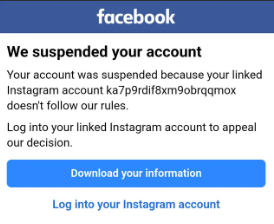
Common messages include:
- Your account has been suspended
- We noticed unusual activity
- Your account is under review
- You cannot use Facebook right now
- Confirm your identity to continue
If you are dealing with a Facebook Account Suspended in 2026 issue, the first step is understanding whether it is temporary, security-related, or policy-related.
Why Facebook Suspends Accounts
Facebook rarely provides a full explanation in one sentence, which is why many users feel confused when they suddenly lose access. In most cases, suspensions happen because Facebook’s automated systems detect unusual behavior, policy violations, or account security risks. Sometimes the suspension is temporary, while other times it may require identity verification or manual review.
Below are the most common reasons Facebook suspends accounts in 2026.
1. Suspicious Login Activity
If Facebook notices your account being accessed from a new country, unfamiliar device, or several locations in a short period of time, it may assume someone else is trying to enter your account.
Examples include:
- Logging in while traveling to another country
- Using multiple devices at once
- Switching internet networks repeatedly
- Logging in with a VPN that changes your location
In these situations, Facebook may temporarily suspend the account to protect your data until ownership is confirmed.
2. Too Many Actions in a Short Time
Facebook monitors behavior patterns. If an account suddenly performs too many actions too quickly, it can look like spam or bot activity.
Examples include:
- Sending dozens of friend requests in one day
- Joining many groups within minutes
- Posting the same comment repeatedly
- Messaging large numbers of people quickly
- Liking hundreds of posts in a short time
Even real users can trigger these limits if activity appears unnatural.
3. Fake Name or Identity Mismatch
Facebook prefers users to use authentic identities. If your profile name appears fake, misleading, or very different from your real identity, Facebook may request verification.
Common triggers:
- Nicknames that look suspicious
- Celebrity or brand names used personally
- Random symbols or numbers in name fields
- Frequent name changes
- Name not matching submitted documents
In these cases, Facebook may ask for an ID before restoring access.
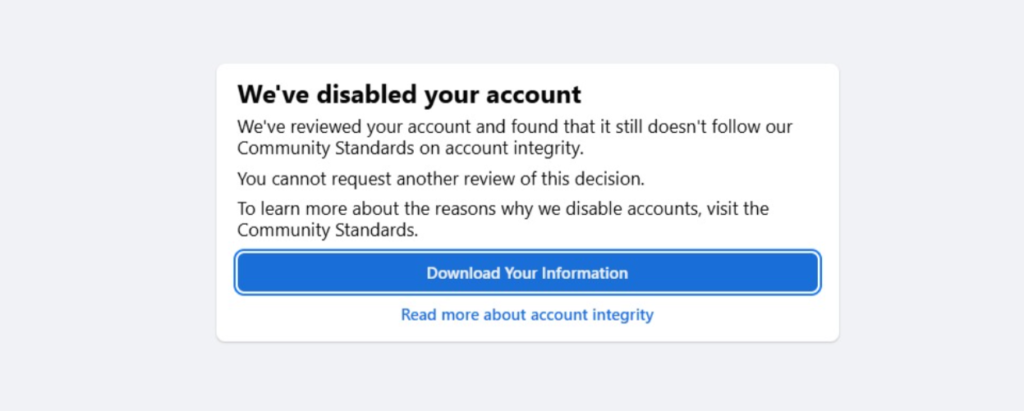
4. Community Standards Violation
Facebook enforces rules on content and behavior. If a post, comment, message, or shared media breaks these standards, the account may face restrictions or suspension.
Possible reasons:
- Hate speech or abusive language
- Harassment or threats
- Copyright-infringing videos or images
- Adult or violent content
- False impersonation accounts
- Repeated misinformation violations
Sometimes one serious violation is enough. In other cases, repeated smaller violations build up over time.
5. Hacked Account Activity
If your account gets hacked and the hacker uses it for spam, scams, or suspicious messages, Facebook systems may suspend the account automatically.
Signs this happened:
- Messages sent that you never wrote
- Password changed unexpectedly
- Strange posts on your timeline
- Ads created without permission
- New devices shown in login history
This type of suspension is often reversible once you secure the account.
Read Also:- Facebook Account Disabled 2026: Ultimate Guide to Reasons, Hidden Causes & Instant Recovery Tricks
6. Business or Ads Related Violations
If your personal account is linked to Facebook Pages, Business Manager, or Meta Ads accounts, issues in those systems can sometimes affect your profile access.
Examples:
- Policy-violating ads
- Rejected payment methods
- Suspicious billing activity
- Repeated ad account bans
- Fake business verification details
Because many business tools are connected to personal profiles, one issue can create wider restrictions.
7. Automation Tools and Bots
Using third-party software for auto likes, auto comments, scheduled spam posting, follower growth, or bulk messaging is risky. Facebook actively detects automated behavior.
This includes:
- Auto friend request tools
- Engagement bots
- Fake follower services
- Browser scripts for mass actions
These tools often lead to temporary suspension first, then permanent penalties if repeated.
8. Multiple Reports From Other Users
If many users report your profile, posts, or messages within a short time, Facebook may review your account.
Reports may happen because of:
- Aggressive messaging
- Fake profile suspicion
- Harassment complaints
- Misleading promotions
- Spam links
Even false reports can trigger temporary review while Facebook investigates.
9. Repeated Rule Breaking Over Time
Some users are not suspended because of one action, but because of a pattern of smaller violations over months.
Examples:
- Frequent comment removals
- Repeated temporary restrictions
- Warning notices ignored
- Continued spam behavior
Facebook often increases penalties step by step.
10. System Errors or False Flags
Not every suspension is correct. Automated moderation systems sometimes make mistakes, especially during unusual login activity or mass reporting.
That is why legitimate users occasionally see suspensions unexpectedly. In these cases, identity confirmation or appeal usually helps restore the account.
First 10 Things to Do Immediately
If you have a Facebook Account Suspended in 2026, the first few actions you take can make a big difference. Many users delay recovery by making rushed decisions, creating new accounts, or repeatedly attempting random fixes. Instead, follow these practical steps first.
1. Do Not Panic and Do Not Create a New Account
Creating a second account immediately can sometimes create more problems, especially if Facebook thinks you are trying to bypass restrictions. Stay focused on recovering the original account first.
2. Use the Same Device You Normally Use
Try logging in from the phone, tablet, or laptop you regularly used before the suspension. Familiar devices often help Facebook recognize trusted activity.
3. Use Your Home Internet Connection
If possible, use your normal home Wi-Fi or regular mobile network. Avoid public Wi-Fi, cyber cafés, or unknown networks during recovery attempts.
4. Check Your Email Inbox
Facebook often sends security alerts, review updates, password reset links, or identity verification requests to your registered email address.
5. Check Spam Folder
Sometimes genuine Facebook emails are filtered into spam, junk, or promotions folders. Check every folder carefully before assuming no email was sent.
6. Reset Password
If the suspension happened because of suspicious activity or a possible hack, changing your password immediately can strengthen your recovery case.
7. Turn Off VPN
VPN services can show different countries or changing IP addresses. This can trigger security systems, so disable the VPN before trying again.
8. Gather Your ID
Keep a clear government-issued ID ready in case Facebook asks you to verify ownership. Make sure the name and details are readable.
9. Remove Browser Extensions
Some browser tools, automation plugins, or suspicious extensions can interfere with login sessions. Disable unnecessary extensions before signing in.
10. Stay Consistent
Use the same browser, same device, and same login pattern while recovering the account. Too many sudden changes can slow the review process.
How to Recover Facebook Account Fast
Method 1: Use Official Review Option
When you try to log in, Facebook may show an appeal or review button. Use it.
Tips:
- Write clearly
- Be respectful
- State you believe account was flagged in error
- Mention if your account may have been hacked
Method 2: Verify Identity Correctly
If Facebook asks for ID:
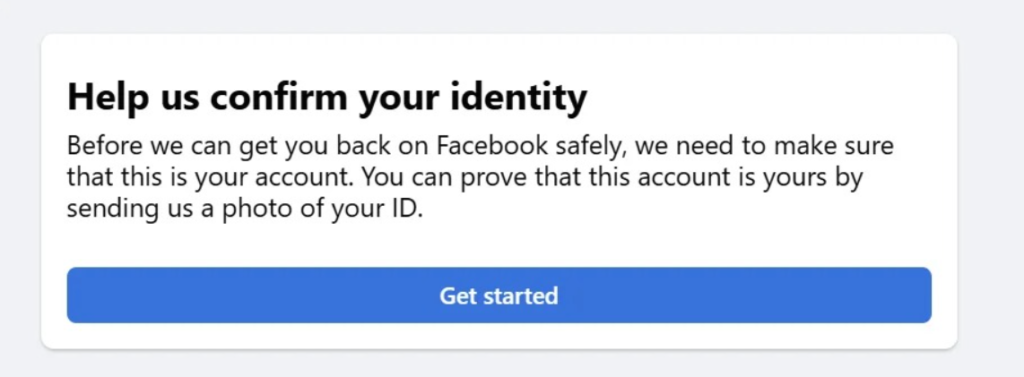
Use:
- Passport
- Driving license
- National ID
Important:
- Upload clear image
- Full name visible
- No blur
- Match profile name as closely as possible
Method 3: Secure Your Account
Change:
- Password
- Recovery email
- Phone number if outdated
Enable two-factor authentication after recovery.
Method 4: Wait Review Time Properly
Some users fail by repeatedly submitting forms. Submit once, then wait.
Read Also:- How to Fix a Disabled or Restricted Facebook Account: Complete Recovery Guide
Typical review windows:
- Few hours
- 24 hours
- 3 days
- 7 days
- Longer in high-volume cases
30 Powerful Strategies to Recover a Suspended Facebook Account
Recovering a suspended Facebook account is not only about submitting an appeal. In many cases, Facebook checks trust signals, security behavior, profile authenticity, and how you respond during the recovery process. The strategies below are organized step by step so readers can clearly understand what to do.
Identity & Trust Strategies
These methods help Facebook confirm that the account belongs to a real person.
1. Use Real Full Name Everywhere
Your Facebook profile name should closely match the name shown on your official ID. If there is a large mismatch, verification can take longer.
2. Update Date of Birth Correctly
If your date of birth is incorrect and editing is available later, update it honestly. Consistent profile details improve trust.
3. Add Trusted Recovery Email
Use an email address you actively use. Recovery links, password resets, and review notices are often sent there.
4. Add Working Phone Number
A verified phone number can make identity confirmation faster and helps secure future logins.
5. Use Recognized Device
Try recovering the account from the phone or laptop you normally use. Familiar devices may be recognized as safe.
6. Use Same City Login
Login from your usual city or region if possible. Sudden location changes can trigger additional security checks.
7. Remove Fake Profile Elements
Avoid suspicious usernames, copied photos, random symbols, or misleading profile information that may look fake.
8. Add Real Profile Photo
A genuine and clear profile photo often creates a more trustworthy profile than blank or anonymous accounts.
9. Avoid Rapid Login Attempts
Do not keep trying every few minutes. Too many failed attempts can extend security restrictions.
10. Keep Browser Cookies Enabled
Cookies help Facebook identify previous trusted sessions. Blocking them may interrupt verification steps.
Security Strategies
These steps show Facebook that the account is secure and safe to restore.
11. Change Password Immediately
If there was suspicious activity, change the password as soon as you get the chance.
12. Use Strong Unique Password
Create a password that is not used anywhere else. This lowers the risk of another compromise.
13. Enable Two-Factor Authentication
Once access returns, activate two-factor authentication for stronger protection.
14. Remove Unknown Sessions
Check all logged-in devices and sign out from sessions you do not recognize.
15. Scan Device for Malware
If your phone or computer has malware, the problem may repeat. Run a full security scan.
16. Remove Suspicious Browser Add-ons
Delete extensions related to bots, auto posting, scraping, or unknown tools.
Appeal Strategies
How you handle the appeal process can affect recovery speed.
17. Keep Appeal Message Short and Honest
Use simple language. Explain that you believe the suspension may be an error or security issue.
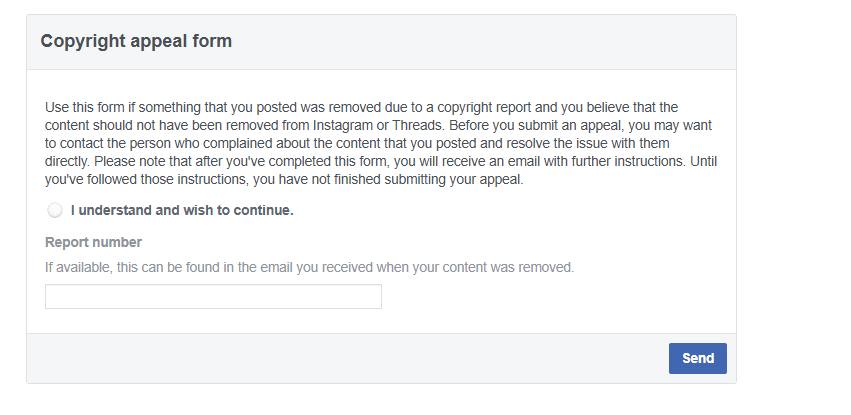
18. Mention If Hacked
If someone else accessed your account, clearly mention it in the appeal request.
19. Mention Business Dependence If Relevant
If you manage pages, ads, or work-related accounts, state this professionally to explain urgency.
20. Submit Correct Documents Only
If Facebook requests ID, upload clear and valid documents. Never send edited or fake files.
Read Also:- Facebook Ads Agency in Delhi | Drive Conversions with JKS Digital’s Ad Experts
21. Avoid Multiple Appeals Same Day
Sending repeated forms may slow review. Submit one complete request and wait.
22. Re-check After 24 Hours
Check status updates calmly once or twice a day instead of refreshing constantly.
Behavior Strategies
These actions reduce the chance of Facebook seeing your activity as spam.
23. Stop Mass Friend Requests
Sending too many friend requests quickly is a common spam signal.
24. Stop Copy-Paste Comments
Repeated identical comments can trigger automated moderation systems.
25. Avoid Joining Too Many Groups
Joining many groups in a short time may appear automated or suspicious.
26. Avoid Auto Posting Tools
Third-party tools that auto post or auto message can create serious account risks.
27. Avoid Buying Followers or Likes
Purchased engagement often comes from fake networks and can lead to penalties.
28. Avoid Fake Engagement Services
Any service promising instant likes, shares, or comments can damage account trust.
Recovery Acceleration Strategies
These final methods help complete the process more efficiently.
29. Login Through Official App and Browser Both
Sometimes the Facebook mobile app shows prompts that the browser does not, or vice versa. Try both official methods.
30. Complete Every Prompt in Sequence
If Facebook asks for steps such as email verification, password reset, photo check, or ID upload, complete them in order. Skipping steps can delay recovery.
Best Appeal Message Example
Subject: Review Request for Suspended Account
Hello Facebook Team,
My account appears to have been suspended. I believe this may be an error or caused by unusual activity. This account is important for personal communication and page management. I have secured my login details and request a review. Thank you.
Keep it professional and factual.
Mistakes That Delay Recovery
- Submitting fake ID
- Sending angry messages
- Creating many new accounts
- Logging in from 10 devices
- Using bots or automation
- Repeated password resets every hour
- Using unknown VPN servers
- Ignoring Facebook emails
If Your Account Was Hacked Then Suspended
This is common. Do this:
- Reset password immediately
- Logout all sessions
- Secure email account too
- Check linked pages and ads
- Mention hack in appeal
- Remove unknown admins later
How Long Does Recovery Take?
Depends on case type.
- Security hold: few hours to 48 hours
- ID verification: 1 to 7 days
- Manual review: several days
- Serious policy review: longer
For many users facing Facebook Account Suspended in 2026, delays happen due to incomplete verification.
Can a Suspended Account Be Permanently Restored?
Yes, many temporary suspensions are reversed after:
- Successful ID check
- Password reset
- Security confirmation
- Manual review approval
Not every case is permanent.
What to Do After You Recover It
Once your Facebook Account Suspended in 2026 issue is solved, protect the account immediately.
Post-Recovery Checklist
- Change password again
- Enable 2FA
- Remove suspicious apps
- Check page roles
- Check ads billing
- Update recovery email
- Review recent activity log
How to Avoid Suspension Again
- Use real identity
- Follow community rules
- Avoid spam behavior
- Post original content
- Do not use growth bots
- Keep security updated
- Use one main trusted device regularly
FAQ
Is suspension the same as permanent disable?
No. Suspension is often temporary or review-based.
Can I recover without ID?
Sometimes yes, if it is only a security check.
Should I create a new account?
Usually no. It can complicate recovery.
Why did Facebook suspend me without warning?
Automated systems often act first, review later.
Final Words
If you are dealing with a Facebook Account Suspended in 2026 problem, the fastest path is not shortcuts. It is trust signals, identity verification, secure login behavior, and a clean appeal process.
Most users lose time by guessing. Follow structured recovery steps, stay patient, and avoid repeated mistakes. In many cases, accounts return once Facebook confirms ownership and safety.