
How To Facebook Account Disabled or Restricted:- In this article you will learn: Why Facebook accounts get disabled, the difference between restricted and disabled accounts, step-by-step appeal process, real case study, hidden truths about Facebook’s system, Business Manager recovery, and how to keep your account safe in 2026.
Table of Contents
- Facebook Jail vs Disabled Account
- Warning Signs Before Account Disable
- Reasons for Facebook Account Disable
- Disabled vs Restricted Comparison
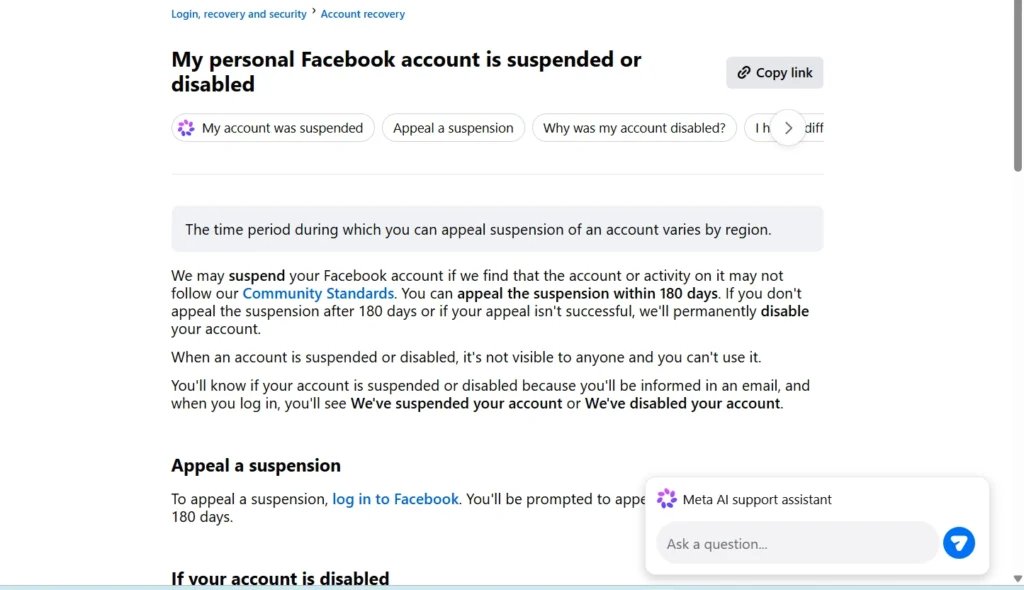
- What to Do Immediately
- Recovery Process Step-by-Step
- Real Case Study
- Hidden Truth About Facebook Disable
- Ads Account and Business Manager Recovery
- Common Mistakes to Avoid
- Prevention Tips
- FAQ
If you are right now trying to log into Facebook and seeing a warning or error message on your screen — I understand exactly how that panic feels. Especially when your business depends on Facebook ads or pages.
But there is no need to worry. I have personally worked with many clients whose ad accounts or personal profiles were suspended without any warning — and in most cases the account can be recovered, you just need to follow the right process.
This guide will tell you exactly what needs to be done — nothing more, nothing less.
How to Recover a Disabled Facebook Account (Quick Answer)
If your Facebook account is disabled or restricted, follow these steps immediately:
- Try logging in and check the exact error message
- Open the official appeal form and submit your request
- Upload a valid government ID if asked
- Write a polite and clear appeal message
- Wait for 3 to 7 days for review
Most accounts are recovered if the correct process is followed without multiple attempts.
Facebook “Jail” — And What Is the Difference From Account Disable?
Let us first clear up something that confuses a lot of people.
“Facebook Jail” is an informal term used when your account is still active but certain features — like posting, messaging, or commenting — get temporarily blocked. This usually lasts anywhere from 24 hours to 30 days. You can still log in and view your profile, but you cannot perform certain actions.
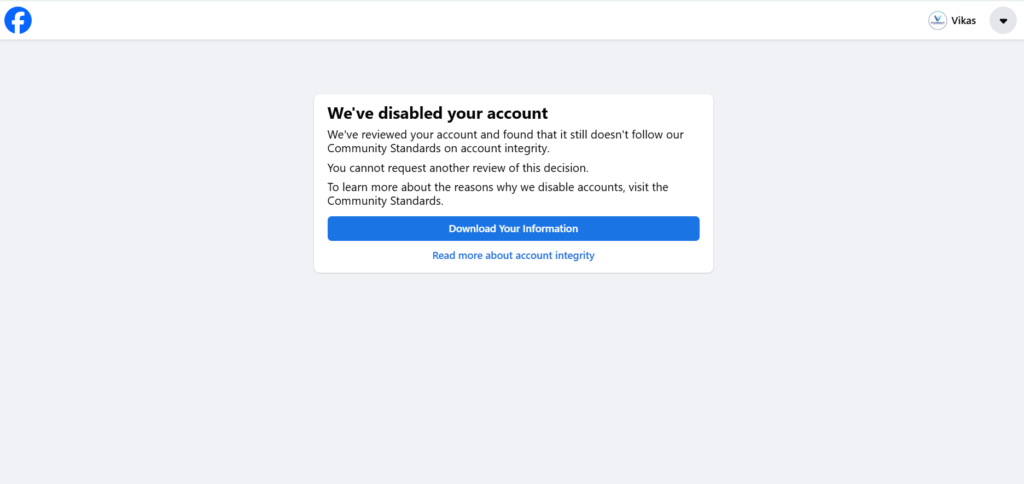
A Facebook disabled account is completely different. When an account is disabled, you cannot log in at all. The entire account gets suspended.
The third category is a permanently disabled account — where Facebook clearly indicates that the decision is final and no further appeal is allowed.
Understanding this is very important because the recovery process is different in all three cases.
In 2026, Meta has further tightened its automated detection systems. This means accounts that previously received warnings before action are now sometimes getting directly disabled — which makes it even more important to understand which category your account falls into before taking any action.
5 Warning Signs Your Account Shows Before Getting Disabled
A Facebook account does not get disabled suddenly. There are signals that come before it which most people ignore. If you have seen these signs before — understand that your account was already at risk.
Warning 1 — Warnings in Account Quality section: This is Facebook’s official section that tells you what went wrong. You should check it regularly — especially if you run ads. In 2026, Meta redesigned Account Quality to show more detailed violation history, which makes it even more useful for catching problems early.
Warning 2 — Sudden feature restrictions: Everything was fine one day, the next day you cannot post or Messenger stops working. This is the first sign of a restricted account. Many advertisers report that this happens overnight without any prior notification.
Warning 3 — Ad account “Under Review” status: If you are an advertiser, this is the most dangerous sign. It means Facebook is manually reviewing your ads and payments may be on hold. If this status stays for more than 48 hours, you should proactively check Account Quality.
Warning 4 — Sudden logout or login alert: An unfamiliar device or location attempted to log in — Facebook took protective action. This is actually Facebook protecting you, but if you ignore the security verification step, the account can get locked permanently.
Warning 5 — Page or Business Manager access removed: You suddenly cannot post content on your business page — this is a signal of a Business Manager level restriction. Losing page access is often the first step before a full account disable happens.
If you ignored these signs and your account is now disabled — no worries. Follow the right steps now.
Read Also:- Why Instagram Accounts Are Getting Restricted in 2026 and How to Recover Them
Why Does a Facebook Account Get Disabled — 9 Real Reasons
According to Meta’s Community Standards and Advertising Policies, accounts that violate platform guidelines or show suspicious behavior can be restricted or permanently disabled. This section is specifically important because when writing your appeal you need to understand the reason. A vague appeal — “I don’t know why it was disabled” — almost never works.
Reason 1 — Community Standards violation: Posts related to hate speech, misinformation, adult content, or violence. Even one serious violation can be enough. In 2026, Meta’s AI content moderation has become significantly more aggressive in detecting borderline content.
Reason 2 — Fake identity or false name: Facebook strictly follows its real name policy. Nicknames, brand names, or symbolic characters — all get flagged. Not matching your government ID is the biggest reason. This is especially common with business owners who created their profiles years ago with informal names.\
Reason 3 — Multiple accounts on one device: This is a red flag for Facebook. If you manage a family member’s account — use separate devices or get authorized admin access. Facebook’s device fingerprinting technology can detect multiple accounts even if you use different browsers.
Reason 4 — Suspicious login activity: Using a VPN, frequently changing devices, or logging in from multiple countries — security systems automatically take action. If you travel frequently and use your Facebook account from different countries, enable trusted locations in your security settings.
Reason 5 — Copyright violation: Using someone else’s video, music, or image without permission. Repeated violations can lead to permanent action. Even background music in Reels or Stories can trigger a copyright strike if it is not licensed content.
Reason 6 — Spam behavior: Sending too many friend requests, mass DMs, or posting the same link repeatedly causes account restrictions. Facebook’s spam detection looks at the velocity of your actions — doing many things in a short time period is treated as automated bot activity.
Reason 7 — Meta Ads policy violation: Misleading claims, prohibited products like crypto, adult content, or tobacco — these can get your ad account disabled and then impact your personal account too. In 2026, Meta added several new categories to its prohibited ads list including certain AI-generated content claims and unverified financial products.
Reason 8 — Payment or billing issues: Failed transactions, chargebacks, or unpaid ad balance blocks both Business Manager and ad account. A single chargeback can trigger a review of your entire advertising history.
Reason 9 — Aggressive activity on a new account: Creating a new account and immediately running ads, sending 100 friend requests in one day — this looks like bot activity and causes instant restrictions. Facebook expects new accounts to show gradual, natural growth patterns.
Disabled vs Restricted vs Permanently Disabled — Complete Comparison
| Feature | Restricted | Disabled | Permanently Disabled |
|---|---|---|---|
| Login possible | Yes | No | No |
| Profile visible | Yes | No | No |
| Appeal option | Not needed | Yes (1 time) | Usually no |
| Recovery time | 24 hrs – 30 days | 3 days – weeks | Mostly not possible |
| Ads running | Paused | Stopped | Stopped permanently |
| Messenger access | Limited | Blocked | Blocked |
| Business Manager | Partial limit | Full loss | Full loss |
| Page admin access | Limited | Removed | Removed |
| Payment methods | Frozen partially | Fully blocked | Fully blocked |
What to Do Immediately — In the First 1 Hour
This is the most critical section. The steps you take in the first hour either greatly improve your recovery chances or permanently damage them.
Step 1 — Do not panic, and do not use any random tool.
I understand — when an account is gone the first instinct is to Google “Facebook account recovery service.” The results that come from there — “guaranteed recovery in 24 hours, contact on WhatsApp” — these are all scams. These people have permanently compromised many accounts. Facebook never asks for your password or OTP to recover an account. In 2026, these scams have become even more sophisticated — some fake websites even look exactly like Meta’s official pages. Always check the URL carefully.
Step 2 — Check official notifications.
Facebook sends you an email — from @facebook.com or @meta.com domain. Check your registered email inbox. It will clearly mention what policy was violated, whether an appeal is allowed, and what steps to take. If you find an email from any other domain claiming to be Facebook — do not click any link in it.
Step 3 — Check Account Quality section (if restricted).
facebook.com/accountquality — here you will get exact information about which feature is restricted, why, and until when. This section also shows your complete violation history which helps you write a better appeal.
Step 4 — Avoid repeated login attempts.
Repeatedly trying wrong passwords or refreshing every minute signals to the security system that someone is trying to hack the account. Wait and follow Facebook’s instructions carefully.
Step-by-Step Facebook Account Recovery Process (2026 Updated)
I have personally used this process in many client cases. Follow it carefully and do not skip any step.
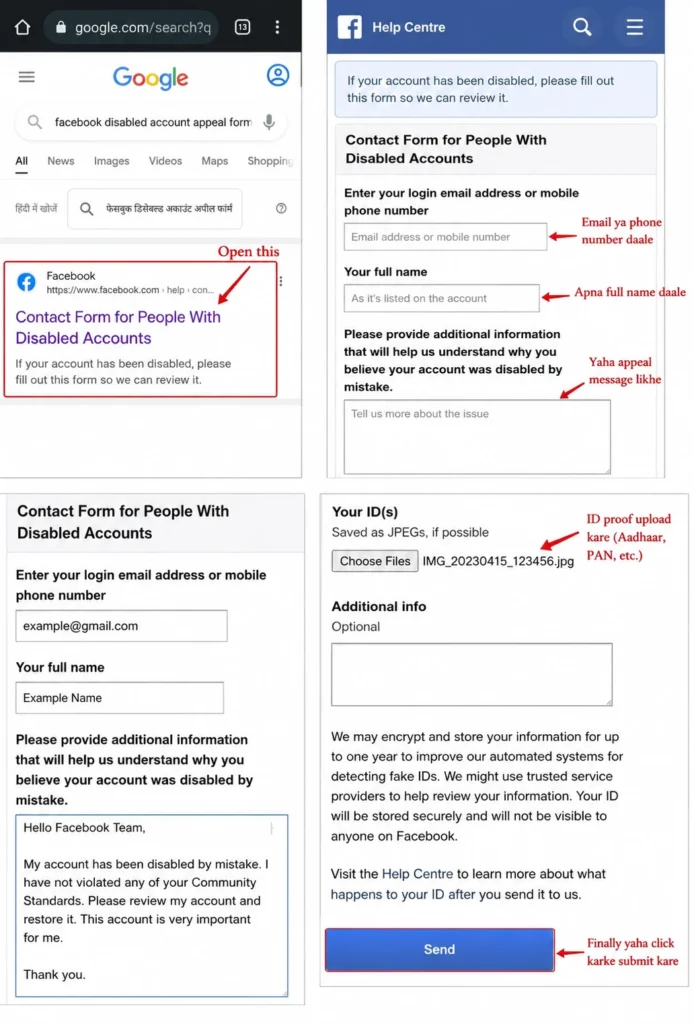
Step 1 — Find the Correct Appeal Form
Facebook’s official appeal form is available at: facebook.com/help/contact/260749603972907
Submit it only once. Multiple submissions reduce your recovery chances because the system marks you as a “spam submitter.” Use the same email or phone number in the form that is registered with the account.
Step 2 — Upload Identity Proof (If Required)
Facebook accepts these documents in India:
- Passport
- Aadhaar card
- Driving license
- Voter ID card
- PAN card as a supporting document
The document should be clear — no cropping, no editing. Name and photo should be clearly visible. Facebook automatically rejects edited documents. The name on the document must be exactly the same as on the Facebook profile. If the profile has a nickname but the document has a legal name — this mismatch can become the reason for rejection.
How long does Facebook take to verify identity? Usually identity verification takes 24 hours to 72 hours, but in some cases it may take up to a week depending on the review queue.
Read Also:- Facebook Ads Agency in Delhi | Drive Conversions with JKS Digital’s Ad Experts
Step 3 — Write the Appeal Message — Template
Many people make mistakes here. Aggressive tone, rude language, or emotional pleading — nothing works. Write a polite, honest, and specific message.
Here is a proven appeal template for 2026:
“I am writing to appeal the disabling of my Facebook account associated with [email/phone]. I understand that my account may have been disabled due to [specific reason if known]. I take full responsibility for my actions and confirm that I have thoroughly reviewed Meta’s Community Standards and Advertising Policies. I assure you that I will strictly comply with all guidelines going forward. I kindly request a manual review of my account and hope for a fair consideration of this appeal.”
If you do not know the reason — write honestly: “I was not made aware of any specific violation, but I am committed to full compliance with Meta’s policies.”
Step 4 — Wait for the Review Period
Restricted accounts: 24 hours to 30 days. Disabled accounts: 3 days to several weeks. During this time do not create a new account, do not repeatedly log in from the same device, and do not submit another appeal.
Step 5 — Support Inbox Follow-Up (Only Once)
If no response comes after 2 weeks and a follow-up option exists in the Support Inbox — follow up only once, politely. Sending too many messages further delays the review.
Real Case Study: How a Disabled Account Was Recovered
One of my clients — a digital marketing agency owner from Delhi — faced a sudden Facebook ad account disable due to repeated ad rejections.
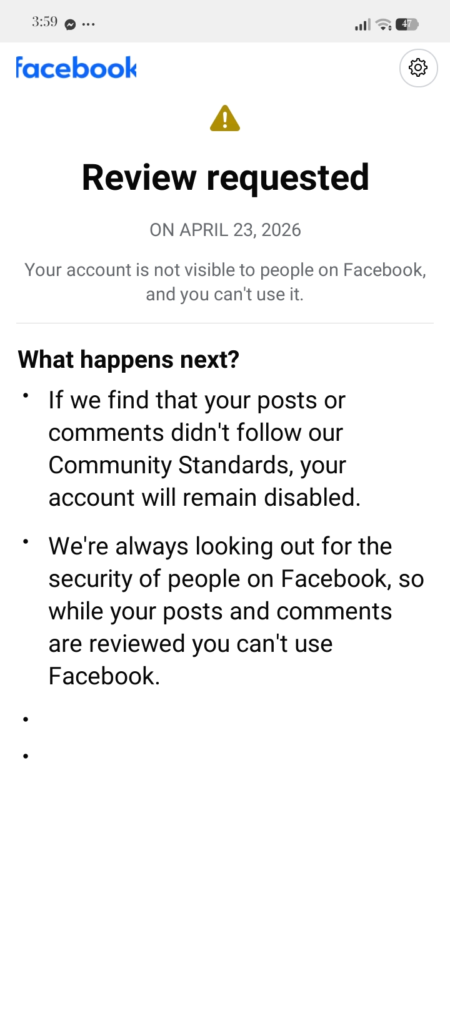
After reviewing the issue carefully, we identified that their ads contained exaggerated claims which violated Meta’s advertising policies. Phrases like “guaranteed results in 7 days” and “100% success rate” were the specific triggers that Meta’s AI flagged.
Here is what we did step by step:
First, we immediately paused all active ads and did not attempt to create new ones. Second, we went through every existing ad and removed all misleading statements and exaggerated claims. Third, we updated the landing pages to match the corrected ad copy. Fourth, we waited 48 hours before submitting any appeal — this cooling period actually helps. Fifth, we submitted a single detailed appeal explaining exactly what the issue was, what corrective steps we had taken, and why it would not happen again.
Within 5 days,ored and campaigns were back to running normally.
The key lesson here is that Facebook does not just want you to say sorry — they want to see that you actually understood the problem and fixed it. A generic appeal saying “please restore my account” fails. A specific appeal showing your corrective actions succeeds.
Read Also:- WhatsApp Account Ban or Restriction: Reasons, Fix & Recovery Guide
Hidden Truth About Facebook Account Disabling
There are several things that most users and even many digital marketers do not know about how Facebook’s disable system actually works.
Hidden Truth 1 — It is mostly AI, not humans: Facebook uses automated AI systems to detect violations before any human review happens. This means your account can get flagged and disabled within minutes of a violation — no human looked at your content before the action was taken.
Hidden Truth 2 — Algorithms trigger instantly: Most account actions — disable or restrict — are triggered instantly by algorithms based on behavioral patterns, content signals, and account history. By the time you notice the disable, the system has already logged dozens of data points about your activity.
Hidden Truth 3 — Manual review only happens after appeal: Here is the important part — a real human at Meta only looks at your case after you submit an appeal. This is why submitting a well-written, specific appeal is so powerful. You are essentially writing to a real person who will make the final decision.
Hidden Truth 4 — Your appeal tone affects the outcome: Facebook reviewers read hundreds of appeals daily. Appeals that are calm, clear, and show genuine understanding of the policy violation get prioritized over emotional or aggressive ones. Your writing tone literally affects whether you get restored or not.
Hidden Truth 5 — Account history matters significantly: If your account has a clean history with no previous violations, your first-time appeal has a much higher success rate. If you have had multiple violations in the past, the reviewer’s bar for restoring your account is significantly higher.
Hidden Truth 6 — Same IP appeals get filtered: If multiple people submit appeals from the same IP address claiming the same account — Facebook’s system flags this as coordinated manipulation. Never ask multiple friends to “help” by submitting appeals on your behalf.
This is why random appeals fail but structured, honest, specific appeals succeed.
Facebook Ads Account and Business Manager Recovery
This section is specifically for people who advertise or manage business pages in 2026.
Why Does an Ad Account Get Disabled?
The most common reason is repeated ad disapprovals. If 3 to 4 of your ads were rejected in one week and you took no corrective action — the system automatically flags your ad account. Misleading claims are also a major reason — phrases like “100% guaranteed results” or “lose 20kg in 1 week” violate Meta Ads policy directly.
Prohibited products are another major cause — political ads during upcoming elections, cryptocurrency offers, adult content, or tobacco-related products cannot run without proper authorization. In 2026, Meta has expanded its prohibited products list significantly. Billing issues — a failed payment or chargeback causes immediate ad account restriction. Even one chargeback from a card dispute can freeze your entire Business Manager.
Business Manager Appeal Process — 2026
Go to facebook.com/accountquality and open the “Ad Accounts” or “Business Manager” section. Click the “Request Review” button. Clearly state what corrective steps you have taken — for example “I have removed the misleading claim” or “I have updated my payment method.” Attach supporting documents if applicable — such as screenshots showing the corrections you made.
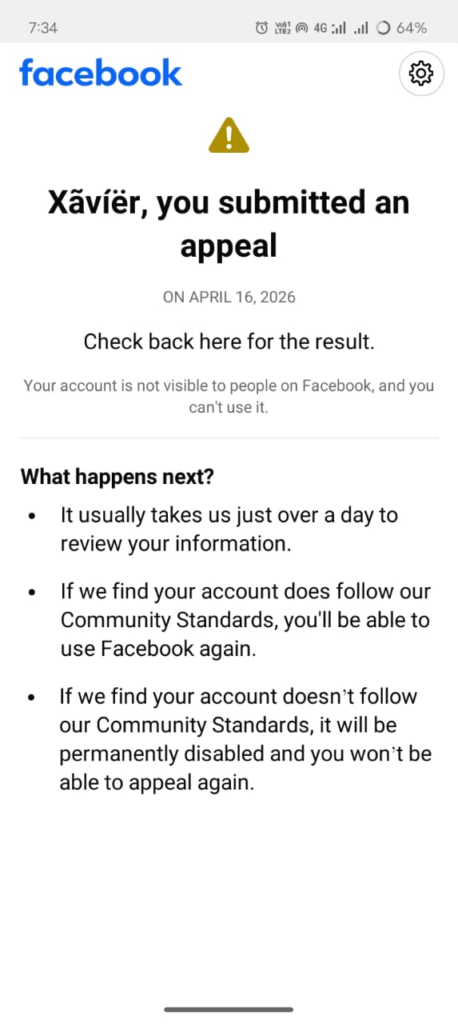
Being specific in the appeal is essential. Generic appeals — “please restore my account” — get rejected every time. Facebook reviewers want to see that you acknowledged the problem and fixed it. Show them evidence of your corrections whenever possible.
Ads Policy Compliance — What to Avoid in 2026
- Superlative claims like “best”, “cheapest”, “guaranteed” without supporting proof
- Before and after images in health or fitness categories
- Click-bait language like “You won’t believe this” or “Doctors hate this trick”
- Landing pages that do not match your ad copy
- Targeting personal attributes like asking “Are you overweight?” or “Are you in debt?”
- AI-generated content that makes unverified product claims — this is a new addition in 2026
- Ads promoting unregulated financial products or investment schemes
Payment Verification Steps
Clear any outstanding ad balances before submitting an appeal. Verify that your payment method is still active and matches the account owner’s name. Avoid frequently changing payment cards as this triggers risk signals. If a chargeback happened, contact your bank to resolve it and get documentation — attach this documentation to your appeal.
Restricted Facebook Account Recovery — Shorter Path
Restricted account recovery is much easier than a disabled account — if you follow the right steps.
Understand the restriction duration first. Facebook’s restriction notice usually tells you when the restriction will end. Most restrictions lift automatically without doing anything special. If your restriction has no end date mentioned — that is a sign it may require active action from your side.
Use Account Quality to understand the full picture. It will clearly list which feature is blocked, due to which violation, and the approximate end date. Read every detail in this section before doing anything else.
Read Also:- Facebook Account Suspended in 2026? How to Recover It Fast
Complete the policy acknowledgment step. Some restrictions require you to explicitly agree that you understand the policy. Do not skip this step — completing it sometimes lifts the restriction sooner than the stated end date.
Avoid risky actions during the restriction period. If posting is restricted — do not keep trying to post. This can extend the restriction period or escalate it to a full disable. Stay patient and let the restriction expire naturally if no action is required.
Common Mistakes That Cause Recovery to Fail
I am writing this section specifically because in many cases I have seen people do everything right — but recovery failed because of these mistakes.
Submitting multiple appeals: After sending one appeal do not send another. The system marks you as spam and the case gets moved to low priority. Many people submit 5 to 10 appeals in frustration — this is the single most common reason recoverable accounts do not get restored.
Uploading fake or edited documents: Facebook’s AI document verification system detects edited documents. If caught — the account can be permanently disabled. Submit only original, unedited government ID documents.

Using third-party recovery services: These people will ask for your password or OTP. Once given, the account goes into their control — permanently. In 2026, many of these scam services operate through Instagram DMs and WhatsApp groups promising guaranteed recovery for a fee. None of them are legitimate.
Creating a new account immediately: If you create a new account right after a disabled account from the same device or IP — that one gets disabled too. Facebook detects linked accounts through device fingerprinting, IP matching, and even writing style patterns.
Writing an aggressive or emotional appeal: “This is my business, you people are ruining me” — this does not work. Only a polite and professional tone is effective. A reviewer who reads an aggressive appeal is less likely to spend time finding a reason to restore your account.
Asking friends to report the disable as a mistake: Facebook’s system detects coordinated reporting patterns. Multiple people reporting the same account issue from different devices actually reduces your credibility rather than helping.
How to Keep Your Facebook Account Safe — Long-Term Prevention
This section is for people who have recovered — or who want to be careful from the start.
Profile Verification: Use your real name that matches your government ID. Verify both email and phone number. Enable two-factor authentication through Settings, then Security, then Two-Factor Authentication. Save your recovery codes in a safe place offline.
Safe Posting Habits: Before posting on controversial topics check that there is no Community Standards violation. Confirm the license before using copyrighted music or videos — especially in Reels and Stories. Verify the authenticity of content before sharing from any group or page. Avoid sharing viral posts without checking their source.
Ads Compliance in 2026: Meta Advertising Policies update quarterly. Check meta.com/policies/ads regularly. Use only honest, verifiable claims in ad copy. Keep landing pages fully consistent with ad content — the reviewer will check both. Keep billing information accurate and updated. Never run ads immediately after creating a new Business Manager — wait at least 2 to 4 weeks and build account history first.
Login Security: Log in only on trusted devices. Avoid unnecessary VPN use — especially if you run ads, as VPN usage is a known risk signal for ad accounts. Enable login alerts through Settings, then Security, then Login Alerts. If you travel internationally, add your travel locations as trusted locations in advance.
Account Health for Long-Term Safety: Focus on organic growth and avoid automation tools entirely. Send friend requests slowly and selectively — not more than 20 per day. Do not join more than 5 groups in a single day. Keep your payment method reliable — use one primary card and do not change it frequently. Maintain a clean content history — delete old posts that may now violate updated policies.
How to Contact Meta Support Directly (India)
This is something very few guides mention — but it is genuinely useful, especially for business accounts.
Meta Business Support: business.facebook.com/help — here you can get live chat or email support if you use a verified Business Manager. This is the most direct way to reach a real Meta support person in 2026.
Help Center: facebook.com/help — detailed articles and direct links for specific issues are available here. The Help Center was significantly updated in 2026 with more specific troubleshooting paths.
Meta for Business India: Contact with Meta’s local support team is possible for India-based advertisers through the Business Manager support section. Indian advertisers spending above a certain monthly threshold may qualify for a dedicated account manager.
Important note: Facebook has no official helpline phone number in India. Any number claiming to be “Facebook support” is a scam. Meta will never call you unsolicited about your account.
Review Timeline — Realistic Expectations for 2026
| Account Type | Minimum Time | Maximum Time | Success Rate |
|---|---|---|---|
| Restricted (minor violation) | 24 hours | 7 days | Very high |
| Restricted (ad violation) | 3 days | 30 days | High if corrected |
| Disabled (first time) | 3 days | 2–3 weeks | Moderate |
| Disabled (repeat violation) | 1 week | Several weeks | Lower |
| Business Manager disabled | 5 days | 4–6 weeks | Depends on evidence |
| Permanently disabled | N/A | N/A | Very low |
If no response comes even after 30 days — do one final follow-up from the Support Inbox. If nothing happens after that — practically consider the account permanently disabled.
FAQ
Why did Facebook disable my account without warning? Automated systems detect policy violations in real time. Some violations — especially serious ones like identity fraud — trigger immediate action without prior warning. In 2026, Meta’s AI systems have become faster and more sensitive, meaning even minor repeated violations can now trigger instant action that previously would have resulted in just a warning.
Can I submit another appeal after one? Technically you can — but practically it has the opposite effect. Only one strong, well-written appeal works. Multiple appeals cause the case to get deprioritized and can signal to reviewers that you are not taking the process seriously.
Can I create a new account when the old one is disabled? If Facebook has clearly confirmed permanent disabling — a new account is theoretically allowed. But do not create one immediately. Wait at least 30 days, use a completely different device, use a different network, and use only real verified information.
Business Manager account got disabled — will my personal profile go too? Not necessarily. Both are separate entities. Business Manager restriction usually does not affect the personal account — but serious or repeated violations can impact both. Always check both Account Quality sections separately.
Appeal ka koi response nahi aaya — what does it mean? Two possibilities: either the case is still under review, or Facebook silently rejected it. Do one follow-up after 30 days. If still nothing — unfortunately consider it permanently disabled and plan your next steps accordingly.
Is there any India-based Meta support? For Business Manager users live chat is available at business.facebook.com/help. For general users only automated support is available. Advertisers with significant monthly spend may have access to a dedicated support line through their account manager.
How long does Facebook take to verify identity? Usually identity verification takes 24 hours to 72 hours, but in some cases it may take up to a week depending on the review queue and the volume of cases Facebook is handling at that time.
What is the success rate of Facebook account recovery in 2026? Based on experience with client cases, first-time violations with a clean account history have a recovery success rate of around 70 to 80 percent when the correct process is followed. Repeat violations reduce this significantly. Ad account recoveries depend heavily on whether the policy issue was genuinely corrected before the appeal was submitted.
Conclusion — Your Account Is a Digital Asset, Treat It That Way
A Facebook account getting disabled — whether personal or business — is a serious situation. But it is not the end.
What I can say from my own experience working with clients on account recovery: in most cases where people follow the right process — especially in first-time violations — the account gets recovered. The cases that fail are mostly when people panic and take wrong steps, use fake recovery services, or send multiple wrong appeals hoping one will work.
In 2026, with Meta’s increasingly automated systems, the margin for error has become smaller. This makes it even more important to act carefully, strategically, and patiently rather than impulsively.
Save this guide in your bookmarks. Share it with anyone else whose account has recently been restricted or disabled.
And if you are still logged in right now — check Account Quality today, enable Two-Factor Authentication, review the ads policy, and make sure your profile name matches your government ID. Prevention is always better than recovery.
Related Articles:
Google Ads vs Meta Ads 2026: Which Platform Gives Better ROI
How to Set Up Meta Business Manager from Scratch
Complete Meta Ads Policy Guide 2026




Pingback: Facebook Account Disabled 2026: Ultimate Guide to Reasons, Hidden Causes & Instant Recovery Tricks - jksdigital.in