Meta Ads Manager Reports:- Running Facebook and Instagram ads is easy. Understanding whether those ads are actually generating results is the real challenge. Many beginners focus only on likes, reach, or impressions, but successful advertisers rely on data, analytics, and reporting to make profitable decisions.
This is where Meta Ads Manager Reports become extremely important.
Meta Ads reporting helps marketers, business owners, freelancers, and agencies understand campaign performance, optimize advertising budgets, and improve overall return on investment (ROI).
In this complete beginner’s guide, you will learn everything about Meta Ads Manager Reports, including how they work, why they matter, important metrics, advanced strategies, common mistakes, and how to create professional reports step by step.
Table of Contents
- What Are Meta Ads Manager Reports?
- Why Meta Ads Reporting Matters
- Understanding the Meta Ads Manager Structure
- Important Metrics Explained
- How to Create Reports in Meta Ads Manager
- Types of Meta Ads Reports
- Advanced Reporting Strategies
- Common Beginner Mistakes
- Meta Ads Reports vs Google Ads Reports
- Frequently Asked Questions
- Final Thoughts
What Are Meta Ads Manager Reports?
Meta Ads Manager Reports is a built-in analytics and reporting feature inside Meta Ads Manager that allows advertisers to track and analyze the performance of Facebook and Instagram advertising campaigns.
These reports provide detailed insights such as:
- Impressions
- Reach
- Clicks
- Conversions
- Engagement
- Cost Per Click (CPC)
- Return On Ad Spend (ROAS)
- Audience demographics
- Placement performance
In simple words, Meta Ads reports help you understand whether your advertisements are actually helping your business grow or simply consuming your budget.
Why Reporting Matters in Digital Marketing
Many advertisers launch campaigns without properly reviewing performance data. As a result, they continue spending money on ads that are not producing meaningful results.
Meta Ads reports solve this problem by helping advertisers:
- Identify high-performing campaigns
- Understand audience behavior
- Optimize ad creatives
- Improve conversion rates
- Reduce wasted ad spend
- Make data-driven marketing decisions
“Creating ads is easy. Understanding ad performance is the skill that separates successful marketers from average marketers.”
Why Meta Ads Reporting Is Important
1. Helps Reduce Budget Waste
One of the biggest benefits of Meta Ads reporting is budget optimization.
Reports clearly show which campaigns are generating results and which campaigns are underperforming. This helps advertisers allocate their budget more efficiently.
For example:
- If one ad set is producing cheaper leads, you can increase its budget.
- If another campaign has high spending but low conversions, you can pause or optimize it.
2. Helps You Understand Your Audience
Meta reports provide valuable audience insights such as:
- Age
- Gender
- Device usage
- Geographic location
- Placements
- Interests and behaviors
These insights help businesses create more targeted and effective advertising campaigns.
Read Also:- What Is Meta Partnership Ads Hub? Complete Guide for Brands & Creators 2026
3. Improves Campaign Performance
By analyzing reports regularly, advertisers can identify:
- Weak-performing creatives
- Poor audience targeting
- High CPC campaigns
- Low conversion rates
This allows continuous optimization and better campaign performance over time.
4. Essential for Agencies and Freelancers
Digital marketing agencies use Meta Ads reports to:
- Show measurable results to clients
- Create professional reports
- Improve transparency
- Build trust
- Increase client retention
Professional reporting is one of the most important factors in maintaining long-term client relationships.
Understanding the Meta Ads Manager Structure
Before creating reports, it is important to understand the structure of Meta Ads Manager.
Meta Ads Manager has three primary levels:
| Level | Purpose | Reporting Benefit |
|---|---|---|
| Campaign | Defines the campaign objective | Measures overall strategy performance |
| Ad Set | Defines audience, budget, and placements | Tracks audience performance |
| Ad | Contains the actual creative | Analyzes creative effectiveness |
Each level provides different types of insights.
For example:
- Campaign-level reports show overall business performance.
- Ad-level reports show which creative performs best.
Important Metrics Explained
Understanding metrics is extremely important for campaign optimization.
Impressions
Impressions show how many times your advertisement appeared on users’ screens.
A single user can generate multiple impressions.
Reach
Reach measures the number of unique people who saw your advertisement.
This metric helps understand audience size.
CTR (Click Through Rate)
CTR measures how many users clicked your ad after seeing it.
Read Also:- What Is Meta Leads Centre? Full Guide for Businesses & Creators
A higher CTR usually indicates:
- Better ad creatives
- Strong messaging
- Relevant targeting
CPC (Cost Per Click)
CPC measures how much you pay for each click.
Lower CPC often indicates:
- Better relevance
- Higher ad quality
- Efficient targeting
CPM (Cost Per 1,000 Impressions)
CPM measures advertising cost efficiency for impressions.
This metric is especially important for:
- Brand awareness campaigns
- Reach campaigns
- Video campaigns
ROAS (Return On Ad Spend)
ROAS is one of the most important metrics for advertisers.
It measures how much revenue is generated from your advertising spend.
For example:
- Spend: ₹1,000
- Revenue Generated: ₹5,000
- ROAS: 5x
A higher ROAS generally indicates a profitable campaign.
How to Create Reports in Meta Ads Manager
Creating reports inside Meta Ads Manager is simple once you understand the process.
Step 1: Open Meta Ads Manager
Go to:
- business.facebook.com
- ads.facebook.com
Login using your Meta Business account.
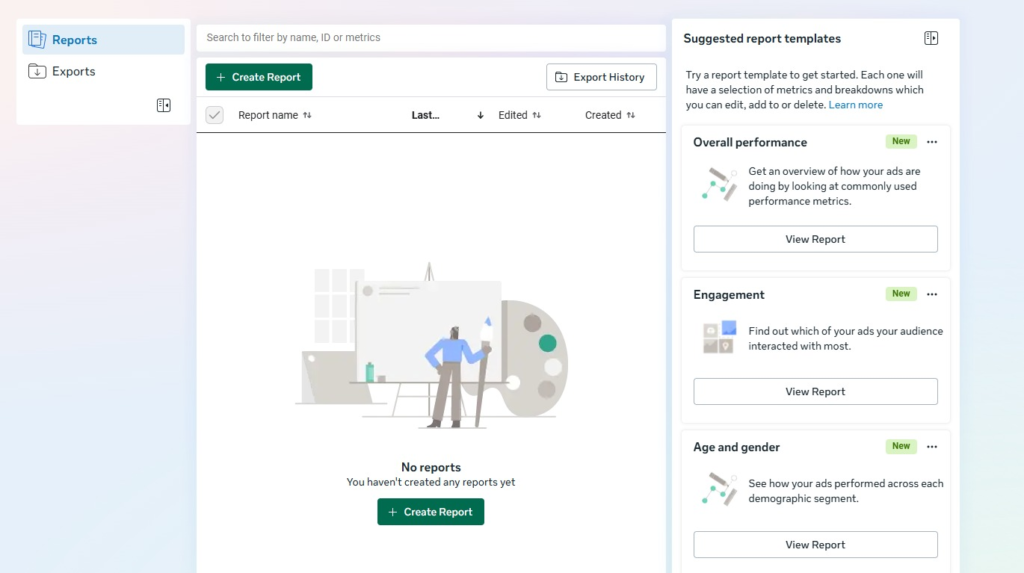
Step 2: Navigate to the Reports Section
On the left sidebar, click:
Reports
You will see:
- Report templates
- Saved reports
- Export options
Step 3: Click “Create Report”
Read Also:- What Is Facebook Branded Content? Complete Guide for Creators (2026)
Choose the type of report you want to generate.
Examples:
- Overall Performance
- Engagement
- Conversion Tracking
- Age and Gender Analysis
Step 4: Select Important Metrics
Choose metrics relevant to your goals such as:
- Reach
- CTR
- CPC
- CPM
- Purchases
- Leads
- ROAS
Avoid adding unnecessary metrics.
Step 5: Apply Filters
You can filter reports based on:
- Date range
- Campaign
- Device
- Placement
- Audience
- Platform
Example:
- Last 7 days
- Last 30 days
- Current month
Step 6: Save and Export the Report
Meta allows exporting reports in:
- CSV
- Excel
This is useful for:
- Client presentations
- Team reporting
- Monthly analytics reviews
Types of Meta Ads Reports
Campaign Performance Report
Provides an overview of:
- Reach
- Spend
- Clicks
- Results
- Conversions
Best for weekly performance reviews.
Engagement Report
Tracks:
- Likes
- Shares
- Comments
- Video views
Best for:
- Brand awareness campaigns
- Social engagement campaigns
Conversion Report
Tracks:
- Purchases
- Leads
- Add-to-cart actions
- Signups
Essential for:
- E-commerce businesses
- Lead generation campaigns
Demographic Report
Shows audience performance based on:
- Age
- Gender
- Location
Helps improve audience targeting.
Placement Report
Analyzes performance across placements such as:
- Facebook Feed
- Instagram Feed
- Reels
- Stories
- Audience Network
This helps advertisers identify the most profitable placements.
Advanced Reporting Strategies
Create Custom Columns
Remove unnecessary columns and keep only important KPIs.
This creates cleaner, easier-to-read reports.
Monitor Frequency
Frequency shows how many times users see your ads on average.
If frequency becomes too high:
- Users may ignore the ad
- Engagement may decrease
- Ad fatigue may occur
Analyze A/B Testing Results
Compare:
- Different creatives
- Different audiences
- Different placements
Then scale the best-performing variation.
Use UTM Parameters
UTM parameters help track Meta traffic inside:
- Google Analytics
- CRM systems
- Third-party reporting tools
This provides deeper funnel analysis.
“Data-driven decisions reduce wasted ad spend and improve long-term advertising success.”
Common Beginner Mistakes
Focusing Only on Vanity Metrics
Likes and reach may look impressive, but they do not always generate business growth.
Focus on:
- Conversions
- ROAS
- Cost Per Result
Not Installing Meta Pixel
Without Meta Pixel:
- Conversion tracking becomes inaccurate
- Retargeting becomes difficult
- Optimization becomes weaker
Meta Pixel installation should always be a priority.
Using Too Many Metrics
Overloaded reports become confusing.
Keep reports focused and goal-oriented.
Ignoring Reports for Long Periods
Many advertisers review campaigns only once every few weeks.
Weekly analysis is essential for optimization.
Not Taking Action on Insights
Reports are useful only when advertisers take action based on the data.
Always optimize campaigns using report insights.
Meta Ads Reports vs Google Ads Reports
| Feature | Meta Ads Reports | Google Ads Reports |
|---|---|---|
| Platforms | Facebook & Instagram | Google Search & YouTube |
| Audience Insights | Excellent | Moderate |
| Creative Tracking | Strong | Limited |
| Intent-Based Advertising | Moderate | Excellent |
| Social Engagement Metrics | Strong | Weak |
| Best For | Social advertising | Search intent marketing |
Both platforms are powerful, but they serve different marketing objectives.
Frequently Asked Questions
Are Meta Ads Reports free?
Yes, Meta Ads Manager Reports are completely free for all advertisers using Meta Ads Manager.
Can I export Meta Ads reports?
Yes, Meta Ads Manager Reports are completely free for all advertisers using Meta Ads Manager.
Which metrics are most important?
The most important metrics depend on campaign goals.
Examples:
E-commerce → ROAS
Lead Generation → Cost Per Lead
Brand Awareness → Reach & CPM
Does Meta Ads reporting include Instagram data?
Yes, Meta Ads Manager tracks both Facebook and Instagram advertising performance.
Can agencies create custom reports for clients?
Yes, agencies can create custom report templates and export them for client presentations.
Final Thoughts
Meta Ads Manager Reports are one of the most valuable tools for advertisers, agencies, freelancers, and business owners.
These reports help marketers:
- Understand campaign performance
- Optimize ad spending
- Improve conversions
- Track ROI
- Make smarter business decisions
The most successful advertisers are not always the ones with the biggest budgets — they are the ones who understand their data.
Start simple:
- Create one report
- Track a few important metrics
- Optimize one thing every week
Over time, these small improvements create massive long-term results.
“Running ads is one skill. Understanding data is another. Master both, and your marketing performance will completely change.”