Facebook Account Recovery Without Email and Phone Number:- Losing access to a Facebook account can be quite frustrating, especially when you no longer have access to the email address or phone number connected to your account. The situation can become even more difficult when you don’t remember your password and don’t know which option to use to recover your account.
The good news is that losing access to your old email address or phone number does not always mean that your Facebook account is gone forever. Depending on your account and the recovery options available through Facebook, you may still be able to find your profile and regain access to your account.
However, one important thing you need to understand is that there is no universal trick that can unlock every Facebook account without verification. Facebook may ask you to confirm that you are the actual owner of the account before allowing you to reset your password.
In this guide, we’ll look at the practical methods you can try when you no longer have access to your usual email address or phone number.
We hope this guide is helpful for you. If you find this guide helpful, you can join our WhatsApp Community and Facebook Group mentioned at the bottom of this article, and let us know that you found the guide helpful.
Can You Recover a Facebook Account Without Email and Phone Number?
Sometimes, yes. But it depends on what recovery options Facebook offers for your particular account.
If you cannot access the email address or mobile number that was previously connected to your account, Facebook may still be able to identify your account using information such as your name, username, profile, or a device that you have previously used to log in.
The recovery process can also look different from one account to another. You might see a password reset option, another verification method, or you may be asked to provide additional information.
So, don’t assume that the account is permanently lost simply because you cannot receive a code on your old number.
At the same time, be realistic about the situation. Knowing your Facebook name alone does not guarantee account recovery. Facebook needs enough information to establish that you are the rightful account owner.
What You Should Have Before Starting Facebook Account Recovery
Before trying different recovery options randomly, collect whatever information you still remember about the account.
You don’t need to have everything on this list. Even one or two pieces of information can make it easier to locate the correct profile.
1. Your Facebook Name
Remember the name that was displayed on your Facebook profile.
If you have a common name, several profiles may appear in the results, so you’ll need another way to recognize your account.
2. Your Facebook Username or Profile Link
If you know your Facebook username, it can be particularly useful for identifying the correct account.
For example, if your profile URL looked something like:
facebook.com/yourusername
the yourusername portion can help you locate the profile.
If you don’t remember the username yourself, you can also ask someone who is already connected with you on Facebook to open your profile and share the profile link with you.
3. An Old Password
Even if the password you remember is no longer working, it can still be useful information to have when you’re trying to regain access.
Don’t keep guessing random passwords repeatedly. Instead, think about the password you actually used for the account and follow Facebook’s recovery instructions.
4. A Previously Used Device
This is one of the most useful things to try.
If possible, use the phone, tablet, or computer from which you previously logged into the Facebook account. Also try the browser you normally used at that time.
A familiar device can provide Facebook with additional context about your previous account activity. Facebook’s own recovery guidance specifically recommends trying recovery from a device you have used to log in before.
Important: This does not mean that an old device automatically unlocks your account. It simply gives you a better starting point for the recovery process.
How to Recover Your Facebook Account Without Email or Phone Number
Once you’ve gathered whatever account information you still have, start with Facebook’s account recovery process rather than using third-party recovery websites.
Step 1: Open Facebook’s Account Recovery Page
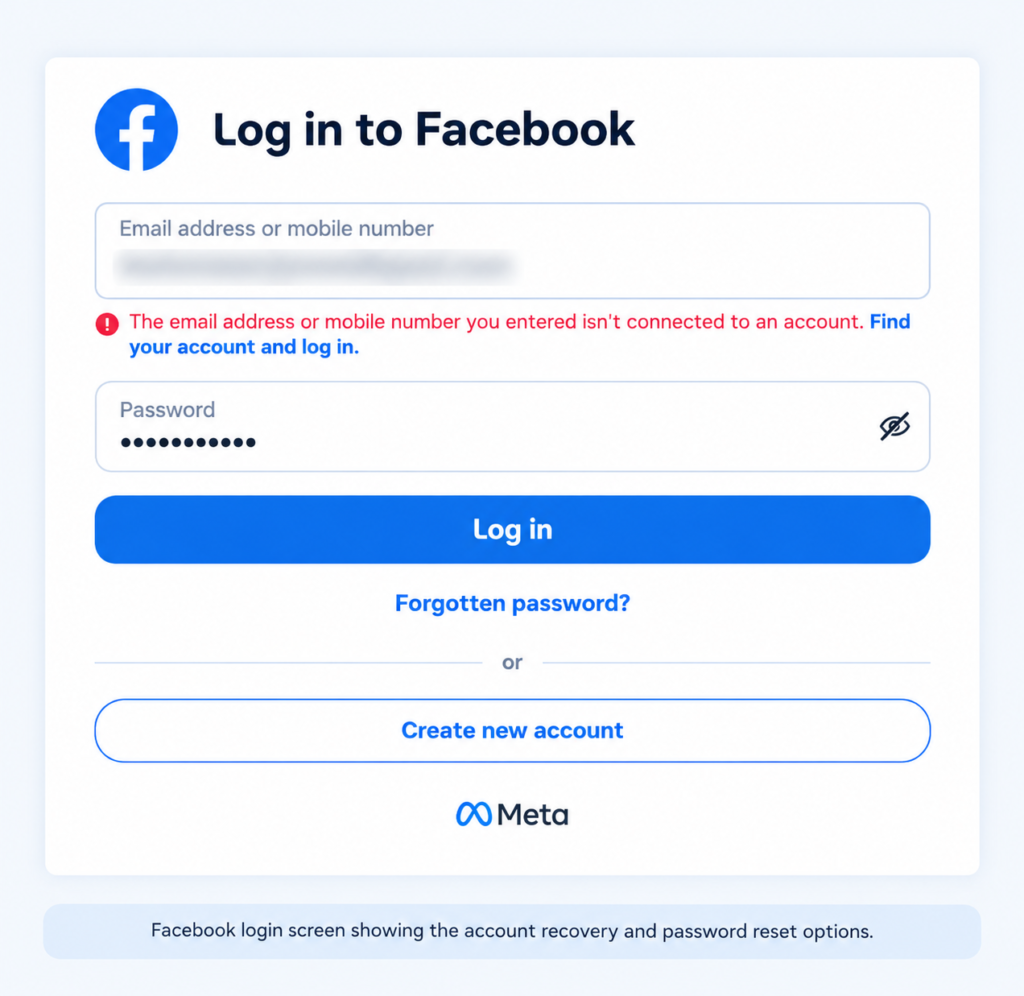
Start by opening Facebook’s login or account recovery page.
If you’re using a computer, open Facebook in the browser you normally use. If you’re using a phone, you can try the Facebook app or a browser.
Look for the option related to a forgotten account or password and begin the recovery process.
Facebook’s current login interface provides an option for users who have forgotten their account details.
Screenshot placement:
यहाँ Facebook login/recovery page का screenshot लगाएं।
Why you should start with Facebook itself
You may find websites claiming that they can recover a Facebook account for a fee. Avoid these services.
You don’t need to give a stranger your Facebook password, OTP, recovery code, or remote access to your computer just because you’re unable to log in.
For account recovery, always start with Facebook’s own recovery system.
Step 2: Find Your Facebook Account
If you don’t have access to your old email address or phone number, the next challenge is identifying the correct Facebook account.
Depending on the recovery screen available to you, Facebook may allow you to search for your account using information associated with the profile.
Try information you genuinely remember, such as:
- Your full name
- Facebook username
- Profile information
- An email address previously associated with the account
- A phone number previously associated with the account
If you have a profile link, that can make identifying the account much easier.
What if you don’t remember your username?
Don’t worry. Your username isn’t the only way to find an account.
Ask a friend or family member who can still see your Facebook profile to open your profile. They may be able to copy the profile URL and send it to you.
This is often more useful than trying dozens of possible usernames yourself.
Screenshot placement:
यहाँ account search/find-your-account screen का screenshot लगाएं।
Step 3: Make Sure You Have Selected the Correct Profile
This step sounds simple, but it can prevent a lot of confusion.
If Facebook shows multiple accounts with similar names, don’t immediately select the first result.
Look at details such as:
- Profile picture
- Name
- Username
- Other visible profile information
Make sure the profile actually belongs to you.
This becomes particularly important for people with common names. Selecting another person’s profile won’t help with recovery and may simply send you down the wrong recovery path.
A good rule: if you’re not completely sure that the profile is yours, stop and verify it before continuing.
Step 4: Check the Recovery Options Facebook Shows You
After identifying your account, Facebook will show whatever recovery methods are available for that account.
This is where many people get confused.
You might see an old email address or phone number that you no longer use. You may also see another option depending on the account and circumstances.
Don’t assume that another person will see exactly the same screen.
Facebook does not necessarily offer identical recovery choices to every account.
Read Also:- Can You Create a New Facebook Account After Being Disabled? Everything You Need to Know
If an option is available to you, read the instructions carefully and use the method Facebook provides.
If the only displayed method sends a code to an email address or number you can no longer access, don’t enter somebody else’s email or phone number just to receive the code.
Instead, look carefully for any additional recovery option Facebook provides on that screen.
Screenshot placement:
यहाँ recovery options वाला screenshot लगाएं।
Step 5: Use a Previously Used Device When Possible
If you’re having difficulty with recovery, try the process again from a device you have used to access that Facebook account in the past.
For example, if you previously used:
- Your old Android phone
- Your personal iPhone
- Your home computer
- A particular browser
try that device/browser instead of a completely new computer.
This is especially worth trying if you’ve recently changed phones or computers.
Facebook’s recovery guidance recommends using a device that has been used to log in to the account before.
Why this can help
Account recovery isn’t simply about remembering a password. Facebook also uses security signals to protect accounts from unauthorized access.
A previously used device can therefore be more useful than attempting recovery from an unfamiliar device or public computer.
That said, don’t interpret this as a guaranteed bypass. A familiar device does not remove Facebook’s security checks.
Step 6: Follow Any Additional Verification Facebook Requests
Sometimes Facebook may require additional information before allowing an account recovery attempt to continue.
If you see a verification step, follow the instructions shown directly by Facebook.
This is an important point because many unofficial articles make it sound as though there is one hidden recovery method that works for everyone. There isn’t.
Your recovery options depend on your account and what Facebook can use to verify ownership.
If Facebook cannot establish that you are the account owner, it may not allow the password to be reset.
Never send your Facebook password or recovery code to another person claiming that they can complete this verification for you.
A Quick Reality Check Before You Continue
If you have no access to the old email, no access to the old phone number, don’t remember the password, and cannot access a previously used device, recovery can become considerably more difficult.
That’s because Facebook needs some way to establish that the person requesting access is actually the account owner.
So, if you’ve lost all of the usual recovery information, don’t waste time looking for a “secret Facebook password recovery trick.” There is no legitimate method that guarantees access to every account without verification.
The safest approach is to use the recovery options Facebook actually provides for your account.
What If You Don’t Remember Your Facebook Email Address?
Not remembering the email address connected to your Facebook account is actually more common than you might think. People often create an account with an old Gmail address, a school or work email, or an address they haven’t used for years.
If you can still remember your Facebook name, username, profile link, or an old password, you may have enough information to start identifying the account.
Check Your Old Email Accounts
If you have more than one email account, search through the inboxes you used around the time you created or regularly used Facebook.
Try searching for terms such as:
Read Also:- Why Is My Meta Account Disabled? 10 Reasons and How to Recover It
- Facebook security
- Facebook login
- Facebook password
- Facebook confirmation
An old Facebook email can sometimes remind you which email address was associated with the account.
Check Saved Login Information
If you previously logged into Facebook through Chrome or another browser, check whether your login information was saved in the browser or password manager.
You may discover the email address or username you had forgotten.
Important: Don’t share saved passwords or login details with anyone claiming to be a recovery expert.
What If You No Longer Have Your Old Phone Number?
This is another common situation.
Maybe you changed your mobile number, lost your SIM card, or the number was disconnected years ago. The problem starts when Facebook tries to send a verification code to that old number.
Note:- Want to stay updated with the latest Digital Marketing tips, Social Media updates, and online earning ideas? Join the JKS Digital Facebook Group and WhatsApp Channel to stay connected with our latest helpful updates and guides.
If you no longer control that number, don’t try to use somebody else’s number to receive your recovery code.
Instead, look at the recovery options Facebook provides for your account. If another legitimate recovery method is available, follow that option.
It’s also worth trying the recovery process from a device and browser that you previously used to log into Facebook.
What About Getting the Old Number Back?
If the number was recently disconnected and your mobile carrier can legally reissue the same number to you, that may be worth checking with the carrier.
However, don’t assume that an old number can always be recovered. It may have already been reassigned to someone else.
If the number now belongs to another person, never ask them to give you Facebook verification codes. The account recovery process should remain between you and Facebook.
Forgot Both Your Facebook Password and Email?
This is where things become more difficult, but you can still start by locating your account.
Think about what you still know:
- Your Facebook profile name
- Username
- Profile URL
- Old password
- Previous phone number
- Previous email address
- A phone or computer you used to access Facebook
The goal is first to identify the correct account, rather than immediately trying random passwords.
Once Facebook identifies your profile, carefully check which recovery methods are available.
If Facebook provides an option that you can legitimately use, follow the instructions on the screen.
If it doesn’t provide a recovery method that you can access, there isn’t a legitimate shortcut that can simply bypass Facebook’s security checks.
Read Also:- Facebook Appeal Form Guide for Account Recovery (2026 Complete Step-by-Step Guide)
Can You Recover Facebook With Only Your Name?
Your name can help you find your Facebook profile, but it normally isn’t enough by itself to prove that you own the account.
For example, thousands of Facebook users could have the same name. That’s why Facebook may need additional information before allowing someone to change an account password.
If you search using your name and find several profiles, use other details such as your profile picture or username to identify the correct one.
Remember: finding a profile and proving ownership of that profile are two different things.
What If Your Facebook Account Was Hacked?
Sometimes people think they’ve forgotten their password when the real problem is that somebody else has changed the account’s login information.
If your password suddenly stops working even though you’re sure it was correct, consider whether the account may have been compromised.
Signs Your Facebook Account May Have Been Hacked
Look for unusual activity such as:
- Your password no longer works
- Your email address was changed
- Your phone number was removed or replaced
- Posts appeared that you didn’t create
- Messages were sent from your account without your knowledge
- You receive security alerts for logins you don’t recognize
If several of these things happened around the same time, treat the situation as a possible account compromise rather than an ordinary forgotten-password problem.
What Should You Do After a Facebook Account Hack?
Start with Facebook’s official account-security and recovery options.
Don’t pay somebody on social media who claims they can “hack your account back.” Giving them your password, OTP, recovery code, or remote access can make the situation worse.
If you regain access, immediately review the account’s security information and remove anything you don’t recognize.
Facebook Account Recovery Not Working? Try These Things
If you’ve already tried recovering the account but keep getting stuck, don’t immediately repeat the same process dozens of times.
Instead, work through these checks.
Try Your Previously Used Device
If you have an old phone, tablet, or computer that you used to access Facebook, try the recovery process from that device.
Note:- Want to stay updated with the latest Digital Marketing tips, Social Media updates, and online earning ideas? Join the JKS Digital Facebook Group and WhatsApp Channel to stay connected with our latest helpful updates and guides.
Use Your Usual Browser
If you normally used Facebook through Chrome, Safari, Edge, or another browser, try that browser again.
Check That You’re Recovering the Right Account
A similar name or profile can easily lead you to the wrong account. Verify the profile carefully before continuing.
Think About Old Account Information
An old email address, phone number, username, or password can help you identify the account even if you can’t currently access that information.
Don’t Keep Guessing Random Passwords
Repeatedly entering random passwords isn’t a good recovery strategy. If you don’t know the password, use Facebook’s recovery process instead.
Don’t Use Suspicious VPNs or Public Computers
For an account-recovery attempt, your normal device and connection are preferable to an unfamiliar public computer.
Why Facebook May Not Let You Recover Your Account
There isn’t always a technical error when Facebook refuses or limits recovery. Sometimes the security system simply doesn’t have enough information to establish that you’re the account owner.
Some possible reasons include:
- You no longer have access to any recovery method
- Your account information was changed
- You’re using a completely unfamiliar device
- The account has been compromised
- Facebook cannot verify the information you’re providing
- The account may have been disabled or deleted
This is also why websites promising “100% Facebook recovery without verification” should be treated with suspicion.
No legitimate third-party website can guarantee that Facebook will restore access to an account.
Read Also:- Facebook Account Suspended in 2026? How to Recover It Fast
Don’t Fall for Facebook Account Recovery Scams
When someone loses access to an important social-media account, scammers know that they’re likely to be desperate for a quick solution.
You may come across people claiming to be:
- Facebook employees
- Professional account recovery agents
- Ethical hackers
- Cybersecurity experts
- “Meta insiders”
They may ask for money or request your password, OTP, recovery code, or login session.
Don’t give them these details.
A genuine recovery process should not require you to hand over your Facebook credentials to a stranger.
Also avoid websites that ask you to enter your Facebook password just to “check whether your account can be recovered.”
How to Protect Your Facebook Account After Recovery
Getting back into your account is only half the job. Once you’ve recovered it, take a few minutes to make the account easier to recover in the future.
Add an Email Address You Currently Use
Make sure the account has an email address that you actually have access to.
Add Your Current Phone Number
If you have a reliable mobile number, keeping it updated can make future account recovery easier.
Turn On Two-Factor Authentication
Two-factor authentication adds an additional security layer when someone tries to log in.
Use a Strong, Unique Password
Don’t use the same password for Facebook and your email account. If one account is compromised, reused passwords can put the others at risk.
Review Your Login Activity
After recovering the account, check for devices or sessions you don’t recognize and secure the account if anything looks suspicious.
Frequently Asked Questions
Can I recover my Facebook account without email and phone number?
It may be possible in some situations. Your available recovery options depend on your account and what information Facebook can use to verify ownership.
How can I find my Facebook account without an email address?
You can try identifying the account using information such as your name, username, profile URL, or other details you remember about the profile.
Can I recover Facebook using my username?
A username can help you locate and identify your Facebook profile, but it doesn’t automatically prove account ownership or bypass Facebook’s security checks.
What if I forgot my Facebook password and email?
Start by finding your Facebook account using information you still remember. Once you identify the correct profile, check the recovery options Facebook provides.
Can I recover an old Facebook account?
Possibly. It depends on whether the account still exists and whether Facebook can provide a way to verify that you own it.
What if I don’t have my old phone number?
If you no longer control the number, look for another recovery method offered by Facebook. Don’t ask the current owner of the number to provide you with Facebook verification codes.
Can I recover my Facebook account if it was hacked?
You can use Facebook’s account-security and recovery process. If you regain access, change your password and review your security settings and login activity.
Is Facebook account recovery guaranteed without email or phone?
No. If Facebook cannot verify that you are the account owner and you have no accessible recovery method, there is no guaranteed legitimate workaround.
Final Thoughts
Losing access to both your Facebook email and phone number can feel like you’ve completely lost the account, but it’s worth checking what information and devices you still have before giving up.
Start by identifying your account, preferably from a device you’ve used before. Check the recovery options Facebook actually gives you and follow those instructions carefully.
And if the usual recovery methods aren’t available, don’t let the urgency push you toward someone promising a paid “instant recovery.” Your Facebook password, OTP, and recovery codes are private information. Keeping them away from strangers is just as important as getting the account back.
Note:- Want to stay updated with the latest Digital Marketing tips, Social Media updates, and online earning ideas? Join the JKS Digital Facebook Group and WhatsApp Channel to stay connected with our latest helpful updates and guides.